Will this run MxO Well?

87 posts · 2008-06-02 21:40:56 to 2008-07-24 16:10:39

#36300462852 06/02/2008 21:40:56 Will this run MxO Well?

I'm considering buying the computer below, configured by me at IBuyPower.com

My question is... will this set up, and video cards run MxO with NO problem?  Does anyone else have a similar set up that can say it will?  Does anyone see anything in this list that could present a problem?  I need a new computer desperately.  My worst phear is that when I do get one, MxO won't run right. :/

Any help I can get would be much appreciated. SMILEY

"Gamer Phire 520" As configured $1694.00

Case ( [New !!!] Thermaltake Armor+ MX Middle Tower Gaming Case w/420W Power Supply Black )
Power Supply ( 800 Watt -- Power Supply Quad SLI Ready )
Processor ( [== Quad Core ==] AMD Phenom X4 9850 Quad-Core CPU w/ HyperTransport Technology )
Processor Cooling ( [=== Silent ===] Asus Silent Knight AL CPU Cooling Fan System Kit )
Motherboard ( [CrossFire] MSI K9A2 CF-F AMD 790X CrossFire Chipset w/7.1 Sound, Dual Gb LAN, S-ATA Raid, USB 2.0, Dual PCI-E MB )
Memory ( 2048MB [1024MB X2] DDR2-800 PC6400 Memory Module Corsair-Value or Major Brand )
Video Card ( 2x ATI Radeon HD 3650 512MB PCI-Express x16 - running CrossFire mode )
Hard Drive ( 500 GB HARD DRIVE [Serial-ATA-II, 3Gb, 7200 RPM, 16M Cache] )
2nd Hard Drive ( 500 GB HARD DRIVE [Serial-ATA-II, 3Gb, 7200 RPM, 16M Cache] )
CD/DVD Drive ( 16x DVD-ROM Drive Black )
CD-RW/DVD-RW Drive ( [** Special !!! ***] 20X Dual Format/Double Layer DVD±R/±RW + CD-R/RW Drive Black )
Sound Card ( Creative Lab Sound Blaster X-Fi )
Speaker System ( [Black] Logitech X-540 5.1 Surround Speakers + Subwoofer )
Network Card ( Onboard LAN Network (Gb or 10/100) )
Keyboard ( Logitech G15 Gaming Keyboard )
Mouse ( Logitech G5 Gaming Laser Mouse )
USB 2.0 Accessories ( Build-in USB 2.0 Ports )
Meter Display ( Thermal Temperature LCD Display Blue )
Flash Media Reader/Writer ( 12-In-1 Internal Flash Media Card Reader/Writer Black )
Operation System ( MS Windows XP Professional w/ Service Pack 2 )
Case Round Cable ( Professional wiring for all cables inside the system tower )
Case Round Cable ( Rounded Cables for Floppy/HDD/CD/DVD/CD-RW/DVD-RW Drives )

Thank you! SMILEY

#36300462869 06/02/2008 23:12:16 Re:Will this run MxO Well?
I'm not familiar with ATI graphics cards, but I think that should run it fine. You might even be able to get away with applying some custom configuration useropts as well SMILEY" />

-Bru
#36300462898 06/03/2008 01:12:03 Re:Will this run MxO Well?
Honestly I'd recommend going with a single 3850 or 3870 over dual 3650s.  The performance of the single card will be similar if not better and you don't have to deal with any crossfire  quirks (I have dual 3870s and you can't open any in-game browsers with CF enabled, i.e. the sentinel, a ccr, or the scanline receiver without experiencing terrible graphic corruption).  Other than that it'll run MxO just fine. Also what kind of applications other than gaming are you planning on?  If you're not doing a bunch of media encoding or anything then honestly save a bit of cash and go with a dual core system as the 9850 isn't really any faster in games than say the 6400+ X2 and it's quite a bit more.  Now when AMD has the .45nm Shanghai Phenom's out the clock speed should be up enough that it'll be an improvement in all cases but the current crop of Phenom's really isn't any better than going with an Athlon X2 unless you're using any software that specifically makes use of 4 cores. Just a couple things to think about.  Hell you could use the money saved on the CPU to go with Dual 3870s or something. 
#36300462912 06/03/2008 02:40:24 Will this run MxO Well?
Phluff wrote:

Video Card ( 2x ATI Radeon HD 3650 512MB PCI-Express x16 - running CrossFire mode )

O_O I have this Radeon and it is great.
TSR Eryk N.: The game is done. The service and support stopped.
#36300462980 06/03/2008 08:40:15 Re:Will this run MxO Well?
Yeah, I wouldn't see why that wouldn't run MxO well.

I agree with Mercidos though, a single video card at 3850 should be MORE than sufficient for MxO. Dual cards, if not calibrated right, can cause a lot of problems, as he noted with his.

#36300463008 06/03/2008 09:36:43 Re:Will this run MxO Well?
Id go with more Memory myself.
#36300463048 06/03/2008 11:22:40 Re:Will this run MxO Well?
Vaico wrote:
Id go with more Memory myself.
2 Gigabytes is fine, I have 4Gig and with MxO running it rarely gets above 30%, 40% if it's been on for a bit.
#36300463162 06/03/2008 13:39:46 Re:Will this run MxO Well?

Thanks much to you all!  I'm getting some great input.

Based on what I'm hearing, I think I will change the set up to this:

Keepin the 2 gigs of ram (since I'm sticking with Win XP and not Vista... should be phine)

(Instead of two Vid Cards, I'd get 1 a little better):   ATI Radeon HD 3870 512MB PCI-Express x16

(Instead of quad AMD, going to dual Intel): Intel Core 2 Duo Processor E8400 (2x 3.0GHz/6MB L2 Cache/1333FSB)

So... can anyone tell me that this will run MxO with no problems and run it well?  Any other advice?  I'm all ears. SMILEY

Anyone had a problem with the ATI Radeon 3870 with XP on MxO??

#36300463167 06/03/2008 13:53:53 Re:Will this run MxO Well?
Phluff wrote:

Thanks much to you all!  I'm getting some great input.

Based on what I'm hearing, I think I will change the set up to this:

Keepin the 2 gigs of ram (since I'm sticking with Win XP and not Vista... should be phine)

(Instead of two Vid Cards, I'd get 1 a little better):   ATI Radeon HD 3870 512MB PCI-Express x16

(Instead of quad AMD, going to dual Intel): Intel Core 2 Duo Processor E8400 (2x 3.0GHz/6MB L2 Cache/1333FSB)

So... can anyone tell me that this will run MxO with no problems and run it well?  Any other advice?  I'm all ears. SMILEY" />

Anyone had a problem with the ATI Radeon 3870 with XP on MxO??

*cough*  you just wanted me to see this huh...  you know dam well it will run MxO fine  SMILEY.  The only cards that I'm aware of that have problems with MxO are the Nvidia 800 series, so your card should be fine since its ATI

#36300463172 06/03/2008 13:59:09 Re:Will this run MxO Well?
imax wrote:
Phluff wrote:

Thanks much to you all!  I'm getting some great input.

Based on what I'm hearing, I think I will change the set up to this:

Keepin the 2 gigs of ram (since I'm sticking with Win XP and not Vista... should be phine)

(Instead of two Vid Cards, I'd get 1 a little better):   ATI Radeon HD 3870 512MB PCI-Express x16

(Instead of quad AMD, going to dual Intel): Intel Core 2 Duo Processor E8400 (2x 3.0GHz/6MB L2 Cache/1333FSB)

So... can anyone tell me that this will run MxO with no problems and run it well?  Any other advice?  I'm all ears. SMILEY<img src=">

Anyone had a problem with the ATI Radeon 3870 with XP on MxO??

*cough*  you just wanted me to see this huh...  you know dam well it will run MxO fine  SMILEY.  The only cards that I'm aware of that have problems with MxO are the Nvidia 800 series, so your card should be fine since its ATI


pff... SMILEY" width="15" height="15" />  No, some ATI cards have problems with MxO too, I'm just trying to make sure.  I'm hoping someone will post that already has the 3870.

#36300463190 06/03/2008 14:27:10 Will this run MxO Well?
Phluff wrote:


Case Round Cable ( Professional wiring for all cables inside the system tower )

Shouldn't that read

"Case Round Cable (Zip tied to fan blades by immature 5yo child)"

I am concerned about professionals working on a system! SMILEY .

Sounds like a stellar system, and better do fine considering I run at almost maxed settings on a simple Intel Core2 Duo laptop with intel's annoying integrated graphics chipset.

I am (like you) researching buying a new PC for home.
#36300463195 06/03/2008 14:41:11 Re:Will this run MxO Well?
SMILEY I want a better video card
#36300463204 06/03/2008 15:00:17 Re:Will this run MxO Well?
imax wrote:
SMILEY" /> I want a better video card
When Phluff isn't looking go nick her new one. SMILEY

4 8 15 16 23 42
#36300463205 06/03/2008 15:03:50 Re:Will this run MxO Well?
odj wrote:
imax wrote:
SMILEY<img mce_tsrc=" /> I want a better video card
When Phluff isn't looking go nick her new one. SMILEY<img mce_tsrc=" />

hah!  she'd probobly never notice if I just pulled the ol' swictheroo with my video card... hrmmmm....
#36300463209 06/03/2008 15:09:07 Re:Will this run MxO Well?
imax wrote:
odj wrote:
imax wrote:
SMILEY<img mce_tsrc=" /> I want a better video card
When Phluff isn't looking go nick her new one. SMILEY<img mce_tsrc=" />

hah!  she'd probobly never notice if I just pulled the ol' swictheroo with my video card... hrmmmm....


*GRRRRRRRRRRR*

SMILEY

#36300463269 06/03/2008 18:32:08 Re:Will this run MxO Well?
Make that HD 3870 a HD3870 X2 (dual card - 2 cards in one) all the benefits of crossfire action... without the configuration hastles.

Previous to this I would have recommended the same card that PS10N and I have which is the nVidia 7950 GX2 ... but you would have a very hard time finding one.

*edit* Here's a review on the card for you:
http://www.techwarelabs.com/reviews...ideo/hd3870-x2/
#36300463270 06/03/2008 18:35:57 Re:Will this run MxO Well?
Ahhh.. How far we have come from the old days when upping the sped of your machine meant adding an FPU chip... yes a whole chip for dealing with floating decimal point maths. (They build it right into the CPU these days)
#36300463347 06/03/2008 22:20:07 Re:Will this run MxO Well?
phi wrote:
Make that HD 3870 a HD3870 X2 (dual card - 2 cards in one) all the benefits of crossfire action... without the configuration hastles.

Previous to this I would have recommended the same card that PS10N and I have which is the nVidia 7950 GX2 ... but you would have a very hard time finding one.

*edit* Here's a review on the card for you:
http://www.techwarelabs.com/reviews...ideo/hd3870-x2/


Wow... that IS nice!  So... you pheel pretty comfortable that this card won't have any compatability issues or glitches in MxO?

Thank you Phi! SMILEY

#36300463359 06/03/2008 23:50:50 Re:Will this run MxO Well?
Phluff wrote:
phi wrote:
Make that HD 3870 a HD3870 X2 (dual card - 2 cards in one) all the benefits of crossfire action... without the configuration hastles.

Previous to this I would have recommended the same card that PS10N and I have which is the nVidia 7950 GX2 ... but you would have a very hard time finding one.

*edit* Here's a review on the card for you:
http://www.techwarelabs.com/reviews...ideo/hd3870-x2/


Wow... that IS nice!  So... you pheel pretty comfortable that this card won't have any compatability issues or glitches in MxO?

Thank you Phi! SMILEY" />

No issues that I'm aware of.
#36300463362 06/04/2008 00:08:34 Re:Will this run MxO Well?
I have a 3870 and I have lag issues indoors. After spending some time indoors it goes away but whenever I enter an indoor environment for the first time after I log on I get serious lag.

EDIT: I should probably specify further. If the place has a familiar pallette to another indoor area I've been to before it won't be so laggy.

Eg: Running missions in Richland inside the apartment building, first 5 minutes it'll be laggy, soon after I won't have much trouble in any familiar indoor area, but if I were to go inside a building in International (Different Palette/Look to Richland indoor areas) I would have the same sort of issue for the first 5 minutes or so.
#36300463373 06/04/2008 00:57:26 Re:Will this run MxO Well?
That lag is caused by texture caching. The first time you go indoors everything slows because your PC is madly swapping out textures to the GFX memory on the card.

You can fix that by adjusting the caching distances in your options.cfg file to suit your hardware (lots of GRAM = large cache... longer initial load time but faster after that. Not much GRAM = small cache = optimised texture swapping to the card from the HDD = faster texture swapping times)

Also don't forget the 3870x2 has a GPU to swap textures and a GPU to do the drawing ... and twice the GRAM. Dual-cards benefit more than simply a card that is twice the speed.

Incidentally the 3870x2 is slightly overclocked.
#36300463381 06/04/2008 01:54:33 Re:Will this run MxO Well?
Funnily enough I just tried to use the fix the devs implemented for GeForce 8xxx cards and it works, which I find very strange cause two faction mates with 8800's tried that fix and it did nothing.

Does anyone happen to know what those useropts commands actually change in terms of graphical details, if any? I think I can see a difference but it's hard to pinpoint.

modellighting_enable = 0
modellighting_ambadd_r = 0.33
modellighting_ambadd_g = 0.33
modellighting_ambadd_b = 0.33
#36300463384 06/04/2008 02:07:02 Re:Will this run MxO Well?
I have 2 3870s and before that I was using a 2900xt, and I have never had the indoor lag issue. Of course the 3870s are on a Vista Ultimate 64bit box w/ 4GB of RAM, but the 2900xt was an xp pro box with only 2GBs.

Anyway Phluff I'd say going with the 8400 for the CPU is a far better choice for gaming over all.  To put it in perspective the lowest end Core 2 duos perform on par with the highest end Athlon X2 in gaming (and the highest end Phenom is about on par with the fastest X2 in gaming that doesn't use more than 2 cores) so a 3GHz 8400 will far exceed the 2.5GHz 9850 in nearly all gaming situations (the only one I can think that it wouldn't is SupCom with the multicore fix).
#36300463394 06/04/2008 02:48:08 Re:Will this run MxO Well?
I'm running mine on xp, I think just like the 8xxx indoor lag it only happens when you use xp, then again Vista has a whole suite of bugs instead.
#36300463425 06/04/2008 04:51:35 Re:Will this run MxO Well?
I have HD 3870x2 and i'm very pleased with it.The card is amazing..I don't think you will have any problem with XP.On the other hand,i have Vista(Grrrrrrrrrrr) and i have some graphical glitches.Also remember this:3870x2 is a HUGE card,it takes 2 slots.Choose your motherboard wisely!
#36300463445 06/04/2008 07:01:30 Re:Will this run MxO Well?
Pylat wrote:
Funnily enough I just tried to use the fix the devs implemented for GeForce 8xxx cards and it works, which I find very strange cause two faction mates with 8800's tried that fix and it did nothing.

Does anyone happen to know what those useropts commands actually change in terms of graphical details, if any? I think I can see a difference but it's hard to pinpoint.


modellighting_enable = 0 *Turns off Dynamic lighting on character and world object models, like chairs, tables, computers etc.
modellighting_ambadd_r = 0.33 *these 3 lines set the base ambient lighting adjustment for all models to have a 1/3 brightness boost
modellighting_ambadd_g = 0.33 *Red + Green + Blue (in equal amounts) = White (no colour shift)
modellighting_ambadd_b = 0.33 *to see what this does set all values except red to 0 and set red to 0.75 (3/4 boost to red... affected items will turn bright red)

The reason this fixes the slowdown is because for some reason, the more decorative world objects (or doodads) there are in a building the slower everything gets. Rarebit and 9mmFu discovered this by going into buildings with no objects and buildings with lots of objects... Test it yourself by going into a run down old building in Achan with no fixtures... then go into a bank (there's one in Kedemoth I believe). Turning off all the dynamic lighting for these objects seems to fix the slow down.
#36300468113 06/16/2008 14:37:00 Re:Will this run MxO Well?

Thanks everyone phor your help.  After balancing my horse power needs, and what $ I could spend.  I decided to get only the 1  3870 card, with the option to add second card to it later if I want.  The Mother Board is Crossfire enabled and all, so that shouldn't be a problem.  I'd like to see if everything is ok for me with the 1 card phirst. SMILEY

Here is the complete system that I just ordered last night.

If anyone sees anything in there that I should 'not' have done, let me know and maybe I can change it. lol  I will be shipping in a week or two.

Thanks again! SMILEY


Gamer Infinity 8800 Pro
http://www.cyberpowerpc.com/
CPU: (Sckt775)Intel® CoreTM 2 Duo E8400 CPU @ 3.0GHz 1333FSB 6MB L2 Cache 64-bit [+1145]
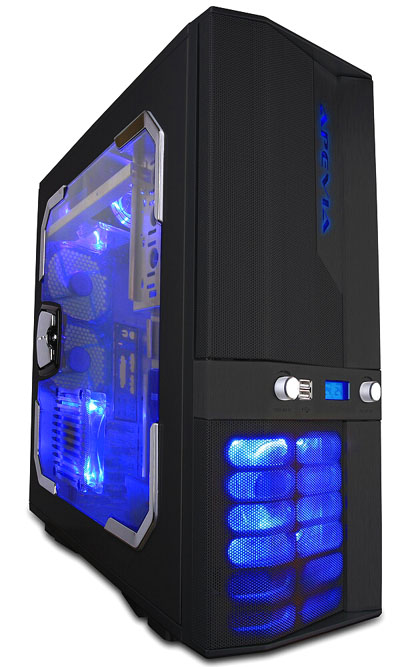
CAS: ($25 off Mail-in Rebate) New! Apevia X-Jupiter Full Tower Gaming Server w/ Temp Display and Fan Control 420 Watt Power [-20] (G Type Black Color with Side-Window)
CASUPGRADE: 12in COLD CATHODE NEON LIGHT [+10] (BLUE COLOR)
CS_FAN: Default case fans
CD: Sony 20X Double Layer Dual Format DVD+-R/+-RW + CD-R/RW Drive [+3] (BLACK COLOR)
CD2: SONY 16X DVD-ROM [+5] (BLACK COLOR)
CABLE: Round Cable Upgrade for Optical Drive [+19]
FLASHMEDIA: INTERNAL 12in1 Flash Media Reader/Writer (BLACK COLOR)
FREEBIE_CU1: FREE! CyberPower Multi-Purpose Carrying Briefcase ($19.99 Value)
FREEBIE_CU2: FREE! Cyberpower Unleash The Power T-Shirt ($19 Value)
FAN: Thermaltake DuOrb CPU Cooling Fan(Slient 21dBA & Overclock Proof w/ Highest Efficiency Cooling) [+15]
FLOPPY: NONE
HDD: Single Hard Drive (500GB SATA-II 3.0Gb/s 16MB Cache 7200RPM HDD)
HDD2: 500GB SATA-II 3.0Gb/s 16MB Cache 7200RPM Hard Drive [+95]
KEYBOARD: Logitech G15 Gaming Keyboard [+80]
MOUSE: Logitech G9 Laser Mouse [+74]
MODEM: Creative Labs PCI 56K v.92 FAX Modem [+16]
MOTHERBOARD: Asus P5K Intel P35 CrossFire Chipset LGA775 FSB1333 DDR2/800 Mainboard w/GbLAN,USB2.0,IEEE1394,&7.1Audio [+25]
MEMORY: (Req.DDR2 MainBoard)2GB (2x1GB) PC6400 DDR2/800 Dual Channel Memory (Corsair XMS2 Xtreme Memory w/ Heat Spreader [+50])
NETWORK: ONBOARD 10/100 NETWORK CARD
OS: Microsoft® Windows® XP Professional w/ Service Pack 2 [+61]
PRO_WIRING: Professional Wiring for All WIRINGs Inside The System Chasis with High Performance Thermal Compound on CPU [+19]
POWERSUPPLY: 800 Watts Power Supplies [+51] (($10 off Mail-in Rebate) Xion SuperNova Power Supply - Quad SLI Ready)
RUSH: NO; READY TO SHIP IN 5~10 BUSINESS DAYS
SERVICE: STANDARD WARRANTY: 3-YEAR LIMITED WARRANTY PLUS 24/7 LIFE-TIME TECHNICAL SUPPORT
SOUND: Creative Labs X-Fi 24-BIT PCI Sound Card [+79]
SPEAKERS: Logitech (BLACK) X-540 70Watts 5.1 Configuration Speaker System
TEMP: THERMAL TEMPERATURE LCD DISPLAY WITH 3X FAN CONTROLLER [+12] (BLACK COLOR)
USB: Built-in USB 2.0 Ports
VIDEO: ATI Radeon HD 3870 PCI-E x16 512MB Video Card [+1] (Sapphire Powered by ATI [+5])
WNC: PCI Wireless 802.11g 54Mbps Network Interface Card

Total $1,745.00

Coupon: SMARTCOMPU (5% Discount) -$87.25
SUBTOTAL $1,657.75
Sales Tax (N/A) $0.00
Shipping: Fedex Ground $65.00
Shipping Discount -$65.00

GRAND TOTAL $1,657.75
Phree shipping and 5% Off helped.... whew.

(But the company I work phor is goin to reimburse me phor 1/2 since I work phrom home some) SMILEY

#36300468150 06/16/2008 16:47:01 Re:Will this run MxO Well?
Do you EVER use Dial-UP internet or send faxes from your PC? If the answer is no then you could ditch the modem. Freeing up a PCI slot and possibly giving you the cash and socket to upgrade that network card to 10/100/1000.

This is purely optional and probably won't make much difference to you.


Other than that the system looks pretty *CENSORED* phine!


*EDIT* Ignore that... stick with the system you chose. Just as I was reading the specs, "Short Skirt, Long Jacket" by Cake came on the radio... I haven't heard that song in ages.

It's a SIGN!
#36300468204 06/16/2008 20:56:35 Re:Will this run MxO Well?
phi wrote:
Do you EVER use Dial-UP internet or send faxes from your PC? If the answer is no then you could ditch the modem. Freeing up a PCI slot and possibly giving you the cash and socket to upgrade that network card to 10/100/1000.

This is purely optional and probably won't make much difference to you.


Other than that the system looks pretty *CENSORED* phine!


*EDIT* Ignore that... stick with the system you chose. Just as I was reading the specs, "Short Skirt, Long Jacket" by Cake came on the radio... I haven't heard that song in ages.

It's a SIGN!

LOL! That's my theme song too! ^_^

And ...yep, I do need the modem for dial up 'backup' in case my wireless internet goes down... which does happen more often than I'd like.  And if it happens when I'm working phrom home... it means driving 35 miles into the office. :/  The gas phor one trip to work and back would pay phor the modem. SMILEY

I didn't realize the network card made that much difference, but it is something I can easily upgrade later since they're not too expensive. SMILEY

Thanks Phi! SMILEY

*counting the days till the thing shows up now*  O_O

#36300468323 06/17/2008 08:01:22 Re:Will this run MxO Well?

Yes, the core2 duo was the better choice but I bet you really wanted to get the PH-enom, huh? SMILEY

#36300468349 06/17/2008 09:52:23 Re:Will this run MxO Well?
It makes me very sad that nearly all PC related items cost 3 times as much in Australia as they do in America.
#36300468359 06/17/2008 10:19:17 Re:Will this run MxO Well?
Pylat wrote:
It makes me very sad that nearly all PC related items cost 3 times as much in Australia as they do in America.
Indeed it sucks, But that's why most of us shop online SMILEY
#36300470815 06/24/2008 23:12:03 Re:Will this run MxO Well?
Update!  SMILEY SMILEY SMILEY SMILEY SMILEY  Just got a tracking number phrom Phed Ex!!

>_>  (I think that's the phirst time I've ever typed 'Phed Ex'SMILEY <_<


It will be delivered THIS PHRIDAY! SMILEY SMILEY SMILEY


Yes, I'm excited... and I'm hoping the transition goes well between my 5 year old 'business' computer to this one.

Which brings me to a question:
What is the easiest or best way to move all my stuff phrom the old computer to this new one?
(yes, it's been a while since I've done this)  Opinions welcome!


Thanks!


#36300471109 06/25/2008 18:40:52 Re:Will this run MxO Well?
XP has a profile transfer program in the accessory menu.

all you need to do is make sure both computers are networked
#36300471150 06/25/2008 20:36:29 Re:Will this run MxO Well?
Phluff wrote:
Update!  SMILEY" /> SMILEY" /> SMILEY" /> SMILEY" /> SMILEY" />  Just got a tracking number phrom Phed Ex!!

>_>  (I think that's the phirst time I've ever typed 'Phed Ex'SMILEY" /> <_<


It will be delivered THIS PHRIDAY! SMILEY" /> SMILEY" /> SMILEY" />


Yes, I'm excited... and I'm hoping the transition goes well between my 5 year old 'business' computer to this one.

Which brings me to a question:
What is the easiest or best way to move all my stuff phrom the old computer to this new one?
(yes, it's been a while since I've done this)  Opinions welcome!


Thanks!


Have your so...slave do it >_> <_<
:p
#36300471182 06/25/2008 21:58:05 Re:Will this run MxO Well?
phi wrote:
XP has a profile transfer program in the accessory menu.

all you need to do is make sure both computers are networked
I dunno the phirst thing about networking two computers. SMILEY  I tried in the past but one was XP and the other was Win2000... then I phound it it couldn't be done.  I tried so many different things back then, I'm tototally confuzzled now. :/

#36300471184 06/25/2008 21:59:16 Re:Will this run MxO Well?
LtCmdr_Tsusai wrote:
Phluff wrote:
Update!  SMILEY<img mce_tsrc=" /> SMILEY<img mce_tsrc=" /> SMILEY<img mce_tsrc=" /> SMILEY<img mce_tsrc=" /> SMILEY<img mce_tsrc=" />  Just got a tracking number phrom Phed Ex!!

>_>  (I think that's the phirst time I've ever typed 'Phed Ex'SMILEY<img mce_tsrc=" /> <_<


It will be delivered THIS PHRIDAY! SMILEY<img mce_tsrc=" /> SMILEY<img mce_tsrc=" /> SMILEY<img mce_tsrc=" />


Yes, I'm excited... and I'm hoping the transition goes well between my 5 year old 'business' computer to this one.

Which brings me to a question:
What is the easiest or best way to move all my stuff phrom the old computer to this new one?
(yes, it's been a while since I've done this)  Opinions welcome!


Thanks!


Have your so...slave do it >_> <_<
:p
That's actually not a bad idea, and I've already called him... he may be over Saturday to help. SMILEY
But... the networking could still be a problem... I dunno.

#36300471244 06/26/2008 00:36:11 Re:Will this run MxO Well?
Phluff wrote:
phi wrote:
XP has a profile transfer program in the accessory menu.

all you need to do is make sure both computers are networked
I dunno the phirst thing about networking two computers. SMILEY" />  I tried in the past but one was XP and the other was Win2000... then I phound it it couldn't be done.  I tried so many different things back then, I'm tototally confuzzled now. :/

networking 2 computers is easy enough. I can give you instructions... possibly even talk you through it over xFire on IMAX's PC SMILEY
However when I can get to an XP machine in about 2 hours I'll double check, you may be able to transfer between machines in an easier fashion.

xFire: xphix
#36300471247 06/26/2008 00:42:46 Re:Will this run MxO Well?
phi wrote:
Phluff wrote:
phi wrote:
XP has a profile transfer program in the accessory menu.

all you need to do is make sure both computers are networked
I dunno the phirst thing about networking two computers. SMILEY<img mce_tsrc=" />  I tried in the past but one was XP and the other was Win2000... then I phound it it couldn't be done.  I tried so many different things back then, I'm tototally confuzzled now. :/

networking 2 computers is easy enough. I can give you instructions... possibly even talk you through it over xFire on IMAX's PC SMILEY" />
However when I can get to an XP machine in about 2 hours I'll double check, you may be able to transfer between machines in an easier fashion.

xFire: xphix
Um... Imax's PC is not here. lol  He lives about 40 miles away. lol

But... this may help:  I have two computers now.  This one has a wireless router, and the hubby's pc is in another room connected to the internet wirelessly to mine. (we never could get them networked because his has Win2000)

Once I have my new one set up, and everything copied from this one to it......... he will get my old computer, and THEN, we will both have Win XP, and can probably get a real network going.

So, I guess... the best thing to do would be to temporarily move the HD out of this one to the new one... copy everything, then put it back in my old one... and reformat it, do a phresh install of XP, and then give it to him.


I dunno... any easier way?


#36300471344 06/26/2008 06:54:55 Re:Will this run MxO Well?
THat's probably the easiest way for you for now... without reconfiguring your pc's to network.
windows 95, 98, 2000, XP & vista all talk to each other just fine... you just need to get the network settings right and set the security to match
#36300471355 06/26/2008 07:09:49 Re:Will this run MxO Well?
phi wrote:
THat's probably the easiest way for you for now... without reconfiguring your pc's to network.
windows 95, 98, 2000, XP & vista all talk to each other just fine... you just need to get the network settings right and set the security to match

Ha, sounds easier than getting my Xbox and PC to talk to each other through my router. My Xbox can connect to the net and so can my PC but they won't even recognise each other is there, despite anything I do! I hate networking.

Personally if I ever get a new PC I'll connect my old HD up and transfer documents and files that way, or transfer via an external HD. Other settings such as looks etc.. I'd do over as I like fresh starts on occasion!

Good luck though Phluff, hope you have no problems with the transfer!

#36300471407 06/26/2008 09:34:34 Re:Will this run MxO Well?

Thanks All!  Computer will be delivered tomorrow, and we'll see how it goes. SMILEY

*bites nails*

#36300471456 06/26/2008 11:42:37 Re:Will this run MxO Well?
LtCmdr_Tsusai wrote:

Have your so...slave do it >_> <_<
:p

/slap
#36300471478 06/26/2008 12:11:44 Re:Will this run MxO Well?
Phluff wrote:

Thanks All!  Computer will be delivered tomorrow, and we'll see how it goes. SMILEY" />

*bites nails*

*bites his nails right next to Phluff*
#36300471517 06/26/2008 13:41:03 Re:Will this run MxO Well?
New computers shouldn't be a cause for nail biting!
#36300471520 06/26/2008 13:50:37 Re:Will this run MxO Well?
TSR-KenC wrote:
New computers shouldn't be a cause for nail biting!
I'm waiting for a call too. Heh.
#36300471532 06/26/2008 14:09:13 Re:Will this run MxO Well?
TSR-KenC wrote:
New computers shouldn't be a cause for nail biting!


Key word... shouldn't  lol

#36300471591 06/26/2008 16:46:06 Re:Will this run MxO Well?
TSR-KenC wrote:
New computers shouldn't be a cause for nail biting!
CELEBRATE TEH SHINY NEW GLORY!


REJOICE AND BE HAPPY!

#36300471652 06/26/2008 18:39:30 Re:Will this run MxO Well?

LOL!!!   SMILEY

I Will!!!!!  ...after I'm sure everything works like it ...should.  hehe

#36300472394 06/28/2008 10:10:53 Re:Will this run MxO Well?
Computer arrived yesterday.
Set it all up... I was so excited...
Plugged everything in.
Turned it on.

The phans all phired up, neon lights phlashed..


Phor about 1/2 a second.


That was it.... then..... nothing.


Called tech supprt, did a test on the power supply.
It's dead.  Power supply is dead. Completely dead.

They are shipping me a new power supply on Monday.  I should have it Wednesday or Thursday, then we have to swap it out.


Phluff is sad.  Really Really Sad.
and... extremely phrustrated.  =( =( =(