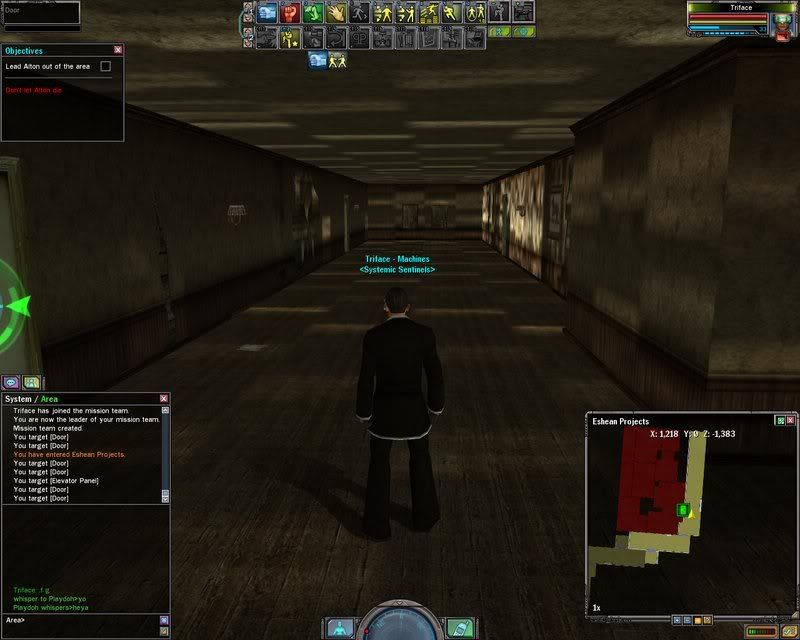
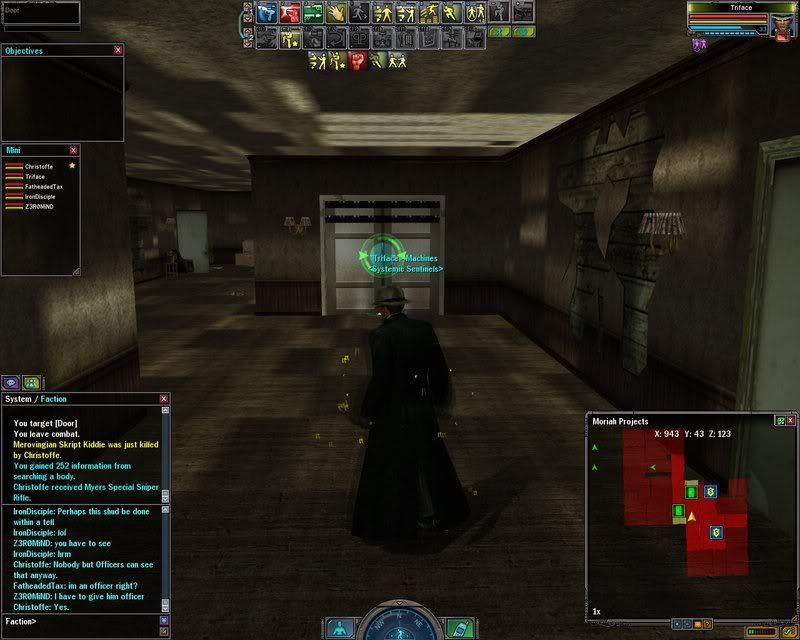
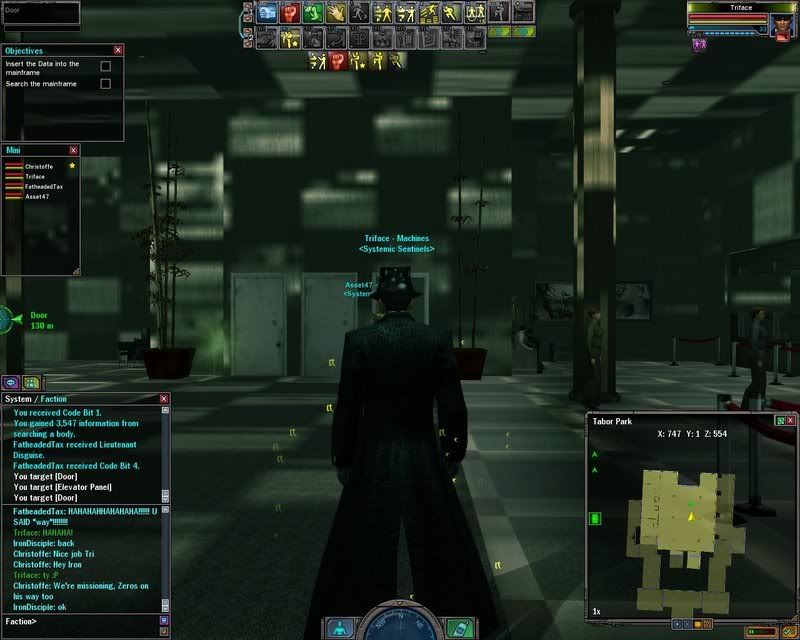
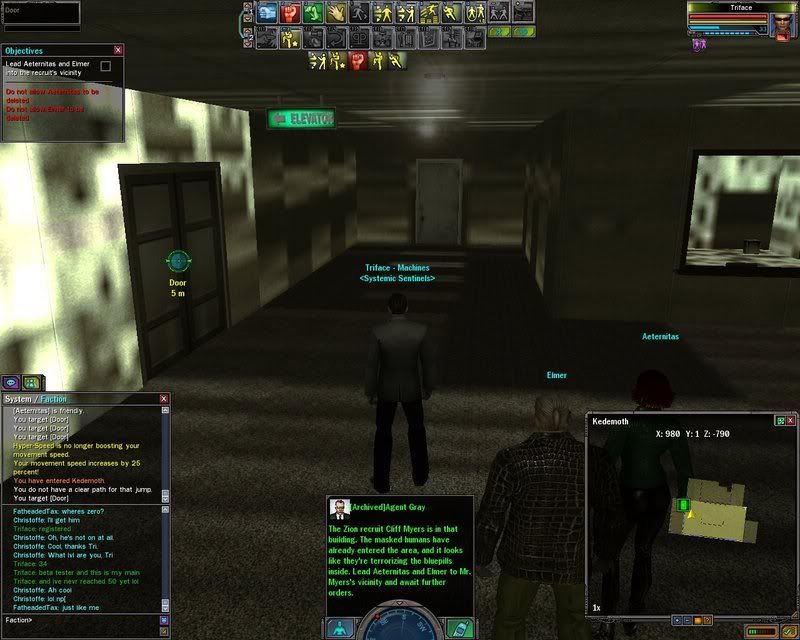
The file is so big i uploaded it here ^.^ It has all my info that you need to look at.
*edited*
#3630041236902/22/2008 12:59:49Re:ATI Radeon 2600 XT AGP Series Bugs
Triface wrote:
Nope using Windows XP and catalyst 8.45.
I should not that the current Catalyst version drivers for your card are 8.2 as of this point so if you are using anything new they are Beta Drivers which I image come with a "use at your own risk" qualifier.
#3630041301302/23/2008 11:02:51Re:ATI Radeon 2600 XT AGP Series Bugs
Yes this drivers are made custom for this card from www.visiontek.com, and thats where i got them because they are the people who made the card. Also when i goto AMD.com the drivers there says its only for PCI-E and i am using a 2600xt AGP.
*edited*
#3630041307602/23/2008 12:34:40Re:ATI Radeon 2600 XT AGP Series Bugs
Custom made? Id only use official drivers...that could be the issue.
#3630041310402/23/2008 13:42:30Re:ATI Radeon 2600 XT AGP Series Bugs
Ill try it but i dont think it will work.
*edited*
#3630041311102/23/2008 13:56:30Re:ATI Radeon 2600 XT AGP Series Bugs
Triface wrote:
Ill try it but i dont think it will work.
Even if it doesnt, a good piece of advice is only use official drivers from ATI. They are released monthly almost so itl always be up to date without any chance of errors.
#3630041313102/23/2008 14:29:02Re:ATI Radeon 2600 XT AGP Series Bugs
Ok as i predicted it didn't work but i did reinstall the ones from visiontek, and the reason i get them from visiontek is because the official drivers aren't compatible with the 2600 xt AGP cards so visiontek has to make their own.
*edited*
#3630041313902/23/2008 14:45:49Re:ATI Radeon 2600 XT AGP Series Bugs
I think your problem is the drivers, but they aren't AGP supported. Maybe there's a download for the latest 2600 agp drivers somewhere? I'll have a look for you but it doesn't look good. :s
#3630041314102/23/2008 14:50:50Re:ATI Radeon 2600 XT AGP Series Bugs
It seems there's alot of people having trouble with it, it's definately driver related. I'm no good with scripts and stuff, though >.< try the link
#3630041316602/23/2008 15:31:29Re:ATI Radeon 2600 XT AGP Series Bugs
also i have been having some crashes i dont know if it is graphical or not lemme check client errors:
Log file opened... 22 Feb 11:46:15.953 [P 3216/T 2220]: [MINOR] Blank animation found in script "DDLbCartLFiring vs SD: :HM".
Log file opened... 22 Feb 15:27:15.718 [P 3520/T 3348]: [MINOR] Failed to find emote animation "Stand_emote_". 22 Feb 16:00:19.093 [P 3520/T 3348]: [MINOR] Blank animation found in script "DDLbCartLFiring vs SD: :HM".22 Feb 16:00:21.125 [P 3520/T 3348]: [MINOR] Blank animation found in script "DDLbRollBkFireFromKnee vs SD: :HM".22 Feb 16:00:57.343 [P 3520/T 3348]: [MINOR] Blank animation found in script "DDLbRollBkFireFromKnee vs SD: :HM".22 Feb 16:01:37.171 [P 3520/T 3348]: [MINOR] Blank animation found in script "DDLbAerialRtFiring vs SD: :HM".
Log file opened... 23 Feb 13:35:34.578 [P 2260/T 3188]: [MINOR] Blank animation found in script "WP vs DP finishing:HH".23 Feb 13:50:12.656 [P 2260/T 3188]: [MINOR] Blank animation found in script "SP vs PB PegCMF blocked forward".
#3630041316802/23/2008 15:34:09Re:ATI Radeon 2600 XT AGP Series Bugs
Do you think my older drivers on my CD might work?
*edited*
#3630041317202/23/2008 15:46:50Re:ATI Radeon 2600 XT AGP Series Bugs
I think you need catalyst drivers 7.6 and up (think the newest ones is 8.2?), that's your problem. It might be an idea to give the ATI support a ring, see what they say! (You did uninstall your previous drivers before you put in your new card didn't ya's?)
#3630041318902/23/2008 16:09:30Re:ATI Radeon 2600 XT AGP Series Bugs
yes i did
*edited*
#3630041319102/23/2008 16:14:27Re:ATI Radeon 2600 XT AGP Series Bugs
Might want to try downloading CCleaner.
Uninstall the drivers, reboot. Use CCleaner to clean up any registery items in the PC from the GFX drivers. Reboot and reinstall the drivers again. Just to make sure it is a fresh install of the drivers.
#3630041319402/23/2008 16:15:59Re:ATI Radeon 2600 XT AGP Series Bugs
ok i might try that
*edited*
#3630041352802/24/2008 08:54:57Re:ATI Radeon 2600 XT AGP Series Bugs
nope didnt fix it
*edited*
#3630041368702/24/2008 16:08:12Re:ATI Radeon 2600 XT AGP Series Bugs
Anymore suggestions people?
*edited*
#3630041708302/29/2008 13:46:50ATI Radeon 2600 XT AGP Series Bugs
Ok i rolled back a driver and it fixed the lagg indoors but i got a bluescreen. Then i remembered all the older drivers are bugged like crap.
*edited*
#3630041720902/29/2008 16:37:04ATI Radeon 2600 XT AGP Series Bugs
Triface wrote:
Ok i rolled back a driver and it fixed the lagg indoors but i got a bluescreen. Then i remembered all the older drivers are bugged like crap.
Bugged how?
#3630041721402/29/2008 16:41:09ATI Radeon 2600 XT AGP Series Bugs
Like the games crash all the time and then when the 8.45 came out everything was fixed. Besides MxO. But i did contact the technical support by email and hopefully the contact me back.
*edited*
#3630041721602/29/2008 16:43:53Re:ATI Radeon 2600 XT AGP Series Bugs
Hm, when ya's say you get a blue screen.. that means the whole screen is blue when ya's play MxO? (Sorry for the 20 questions:P)
#3630041721902/29/2008 16:49:57Re:ATI Radeon 2600 XT AGP Series Bugs
So reading through this forum the poster bridgman that an AGP fix for this may be for coming in the Cat 8.3 drivers.
#3630041722602/29/2008 17:15:54ATI Radeon 2600 XT AGP Series Bugs
Ok sweet also i think i found a temporary driver that works off amd.com its 8.1 so i hope it works i will report back if it does.
*edited*
#3630041722802/29/2008 17:20:10ATI Radeon 2600 XT AGP Series Bugs
Nope it didnt work i how 8.3 work whe nthey come out.
*edited*
#3630041723102/29/2008 17:29:31ATI Radeon 2600 XT AGP Series Bugs
I am trying the Omega Drivers one of the guys mentioned.
Edit: The version is 7.12 but i think i will keep this one until 8.3 comes out and hopefully turn out as a fix. I am installing it right now i will report back on the details.
*edited*
#3630041723202/29/2008 17:40:46ATI Radeon 2600 XT AGP Series Bugs
Ok so i have the Omega Drivers installed and so far they are working. I am going to try MxO i will report back.
*edited*
#3630041723902/29/2008 17:56:12ATI Radeon 2600 XT AGP Series Bugs
*sigh* The omega drivers also crashed me with a bluescreen to come. But i am going back to the 8.45 drivers i previously had they never crashed and the only problem it has is the indoor issues. But i think i will contact ATI to try to make a fix for this in there upcoming drivers.
*edited*
#3630041725602/29/2008 18:24:10ATI Radeon 2600 XT AGP Series Bugs
Ok i have emailed VisionTek and AMD and i will see what they come up with.
*edited*
#3630041804703/02/2008 04:28:29Re:ATI Radeon 2600 XT AGP Series Bugs
:s Not your day, is it?
#3630041813403/02/2008 09:07:27ATI Radeon 2600 XT AGP Series Bugs
lol guess not
*edited*
#3630041874703/03/2008 13:46:54ATI Radeon 2600 XT AGP Series Bugs
Guess what this is what i got from visiontek:
We should be releasing a new driver package early this week that should
resolve the graphics issues with the 2k series AGP cards.
Thank you,
VisionTek Tech Support
Note: When you reply to all e-mails, please click reply with history and
confirm that all previous e-mails are attached for reference
*edited*
#3630042573203/16/2008 11:15:55Re:ATI Radeon 2600 XT AGP Series Bugs
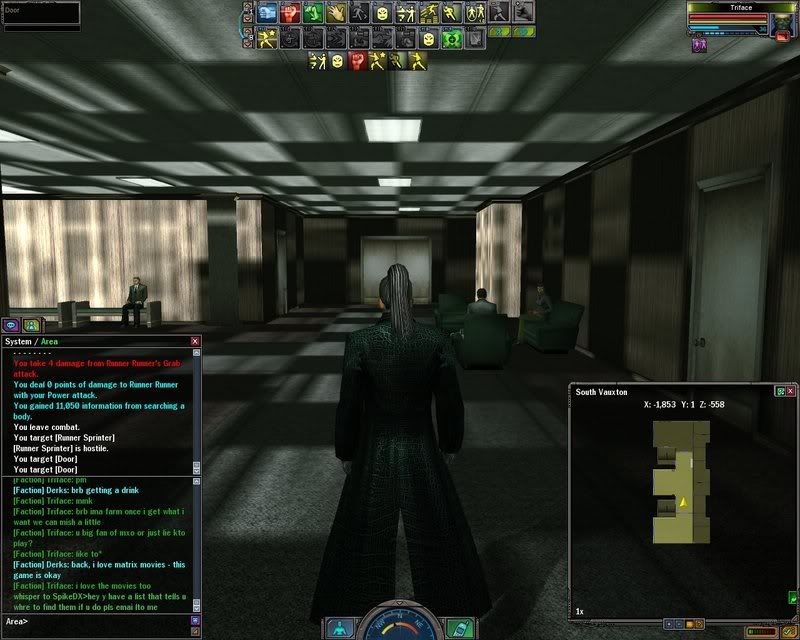
Ok i have done some testing and i moved to Windows Vista Ultimate, and it fixed all of the squares in the buildings and got rid of the lagg, besides of course the vista issues other people are having. But then i reverted back to Windows XP SP2 to see if re-installing the OS might work because it worked in Windows Vista. But unfortunately it still has the checkerboard look.
Here is a close up-to-date picture.
Please Help if you can.....
*edited*
#3630042574503/16/2008 12:07:30Re:ATI Radeon 2600 XT AGP Series Bugs
Ok i might of found a fix, i have downloaded the 8.3 driver which are still not AGP supported and installed them.
This is how i used a little driver tweak i found:
Ok, just so everyone knows... the new 7.12 driver set still does not recognize visiontek 2xxx cards, I am also running Windows XP, so I did the driver hack:
Under "[ATI.Mfg.NTx86]", add the following lines. You can do a search for "HD 2400" to put the lines with the other entries for the HD2000 series, if you wish.
"ATI Radeon HD 2400 PRO AGP" = ati2mtag_RV610, PCI\VEN_1002&DEV_94C4 "ATI Radeon HD 2400 XT AGP" = ati2mtag_RV610, PCI\VEN_1002&DEV_94C6 "ATI Radeon HD 2600 PRO AGP" = ati2mtag_RV630, PCI\VEN_1002&DEV_9587 "ATI Radeon HD 2600 XT AGP" = ati2mtag_RV630, PCI\VEN_1002&DEV_9586
The lines can be placed anywhere under the "[ATI.Mfg.NTx86]" section. For example, your entry could look as follows:
[ATI.Mfg.NTx86] "ATI Radeon HD 2400 PRO AGP" = ati2mtag_RV610, PCI\VEN_1002&DEV_94C4 "ATI Radeon HD 2400 XT AGP" = ati2mtag_RV610, PCI\VEN_1002&DEV_94C6 "ATI Radeon HD 2600 PRO AGP" = ati2mtag_RV630, PCI\VEN_1002&DEV_9587 "ATI Radeon HD 2600 XT AGP" = ati2mtag_RV630, PCI\VEN_1002&DEV_9586
after making sure that the correct drivers were running I also disabled Device manager/System devices/ Microsoft UAA Bus Driver for High Definition Audio.
Everything now works great!!! Please if you are having issues, please try this. I am atleast now content.
#3630042574803/16/2008 12:14:52Re:ATI Radeon 2600 XT AGP Series Bugs
IT DIDNT WORK!!!!!! *CRYS*
Ive done everything
Contacted AMD and Visiontek Made a topic about it on like 3 forums. Reverted to old drivers. Even tried 8.3 drivers. Used CCleaner. Formatted Computer. Used both os's Vista and Xp (Vista did fix the checkerboard issue, but i hate vista) Used lots ok tweaks. Used Omega Drivers. Went Crazy. Banged on the keyboard. Looked and searcher forums and topics!
But i know for sure it is driver related.
9mmfu get you a.ss here and help lol
*edited*
#3630042579003/16/2008 16:26:26Re:ATI Radeon 2600 XT AGP Series Bugs
I'd love to help you here... but I need 2 files: MSCONFIG and DXDIAG (the full versions - email them to [email protected] if you can't link to them): *** Read before posting *** (you know the drill)
In the mean time, run a full system check ( Running Full System Check ) to ensure your textures and animation files aren't corrupted.
Straight away when I look at those screenshots I see that it's the light-mapping that is having a problem. The textures themselves are fine, but the light & shadow maps are at about 33% scale.
Also: NEVER, EVER, run a registry cleaner! They aren't required and cause more problems than they solve. If you need a program to clean out remnants of old video drivers use DriverCleaner Pro ( http://downloads.guru3d.com/download.php?det=745 ) or buy the latest version from drivercleaner.net
uninstall video card
uninstall drivers
run Driver cleaner
reboot
reinstall new drivers
reboot
#3630042586203/16/2008 20:35:10ATI Radeon 2600 XT AGP Series Bugs
Also when go in building i sorta lagg bad. But outside is fine.
EDIT: Ok i have E-mailed you both FULL version files and i did the Full System Check didn't do anything and same for the DriverCleaner Pro.
*edited*
#3630042589803/16/2008 22:25:29Re:ATI Radeon 2600 XT AGP Series Bugs
Can you send your options.cfg and useropts.cfg (if it exists) files, too?
I'l have something for you in about 2 or 3 hours... I'm out of the office at the moment.
#3630042596903/17/2008 06:53:48ATI Radeon 2600 XT AGP Series Bugs
Ok i will do that.
Ok sent.
*edited*
#3630042600703/17/2008 09:29:55Re:ATI Radeon 2600 XT AGP Series Bugs