

Wait, what do you mean by Lost screenshots?
More Useropts Options
341 posts · 2006-03-02 14:03:09 to 2009-05-29 14:43:01
Cool pics. Too bad anyone with dialup is going to have an anuerysm 

sorry that was a type'O on my part. I am kinda on pain meds and umm well you get the idea.
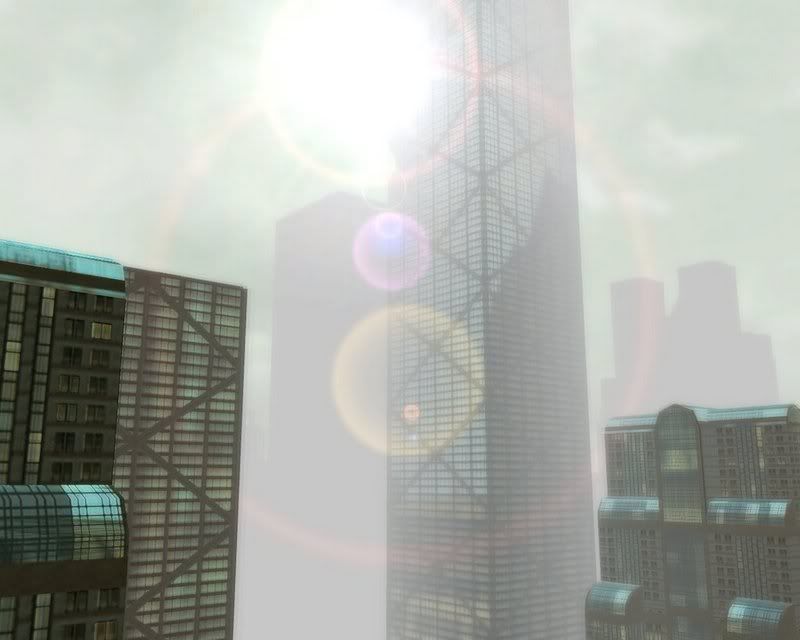
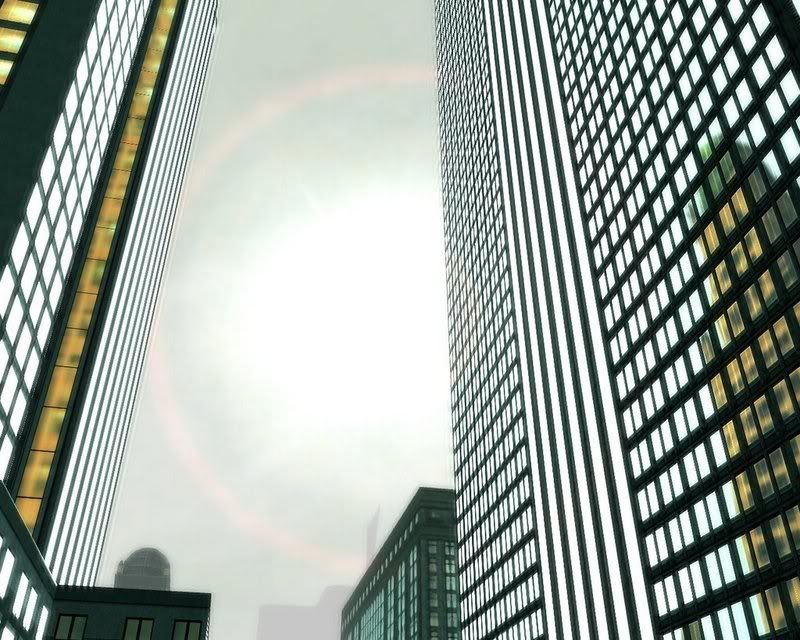
Well here's my standard everyday running around settings... Remember that when it's snowwing or heavy rain the fog distance reduces automatically. I like it because it makes it feel more like real weather.
The pics in this post were produced with the following settings ... you know which file they need to go in <.< (I've only listed settings that will affect image output, JPG settings not listed because all screenshots were taken as BMP and then batch JPEG'd with photoshop):
AntiAliasFSOverSample = 16 #4
AntiAliasFSQuality = 16 #4
SubAlloc_Disable = 0
prealloc_suballocs = 3
wr_drawshadows = 1
wr_wetext_enable = 1
wr_weatherparticle_scale = 1
Richworld_Enabled = 1
Richworld_MaxCars = 25
Richworld_CarDensity = 0.05
Richworld_MaxPeddies = 250
Richworld_PedDensity = 0.5
Richworld_CarDensityUser = 1.5
Richworld_PedDensityUser = 4
TrashMgr_Target_Trash = 20
MipmapOffset = 0
mipmap_bias = -0.4
ScreenFilter_Enable_GreenShift = 1
ScreenFilter_Enable_Overbright = 1
WR_PropShadow_Enable = 1
Grass_Load_Percent = 1
ScreenWidth = 1400
ScreenHeight = 1050
DetailCfg_Detail = 0
DetailCfg_Memory = 0
fx_mode = 2147483647
NoSyncOnFlip = 1
Client_RenderThrottle_Override = 1
WR_DrawWeather = 1
WR_DrawGrass = 1
AntiAlias_Level = 1
WR_Water_Use_Version_2 = 1
CombatText_Enable = 1 #SET THIS TO 0 TO TURN OFF DAMAGE TEXT AND OTHER DAMAGE EFFECTS
GammaScale_R = 1.25
GammaScale_G = 1.25
GammaScale_B = 1.25
wr_prefablodenable = 0
wr_prefablodscale = 0.5
dl_slod_initloadradius = 70000
dl_slod_prefetchradius = 70000
dl_ext_prefetchradius = 70000
dl_int_prefetchradius = 4000
dl_prop_prefetchradius = 12500
dl_sid_prefetchradius = 70000
dl_sidi_prefetchradius = 5000
dl_nav_prefetchradius = 70000
wr_extfardist = 70000
wr_exttointdist = 2500
wr_extobjfardist = 20000
wr_propfardist = 20000
wr_propfadedist = 20000
wr_slodfardist = 250000
wr_skybox_fogrim_fogdst = 130000
wr_fogfardist = 150000
camerafarz = 70000
exteriorcamerafarz = 70000
interiorcamerafarz = 50000
CameraMinDist = 0
CameraMaxDist = 100000000
CameraDefaultDist = 500
=======
The Pics:
=======
My entire gallery can be found HERE on http://www.thekingsofnever.com (the winter site banners have also been made with these settings)

Thought i'd just say WB Fenix 
 Thanx, yeah its good to be back, now i gotta spam the forums to get back up to where i was
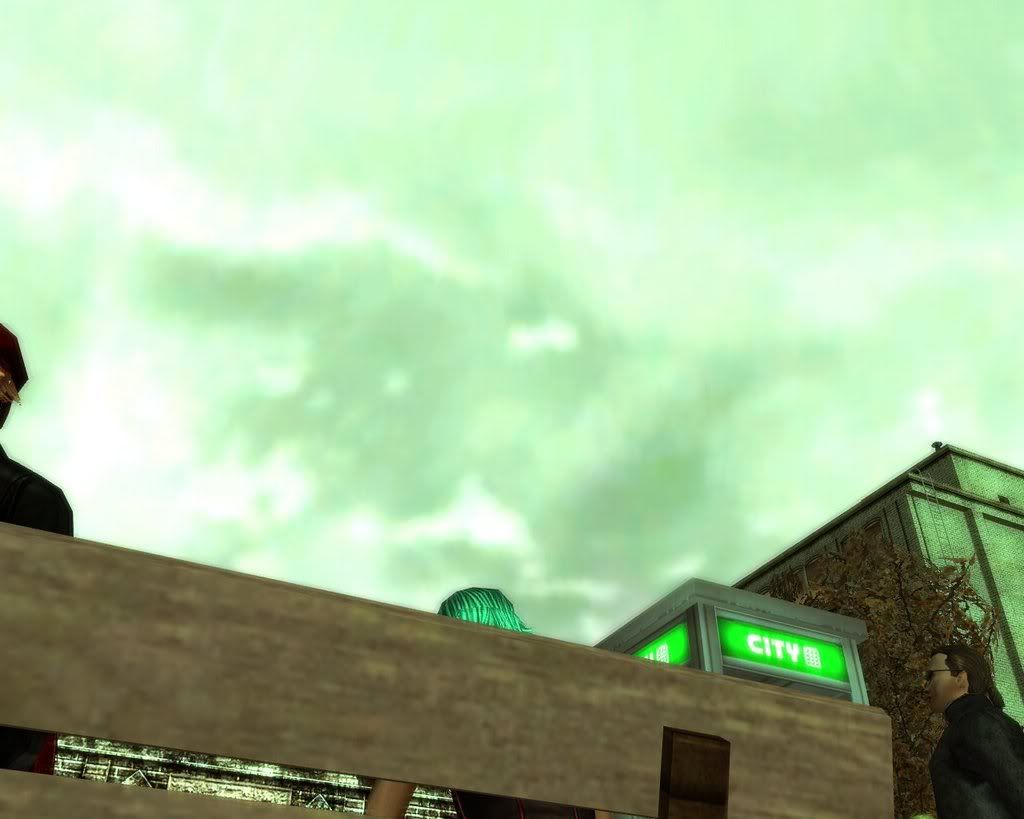
 With these:
Code:
I get screenshots like:
Code:
 Splash0 = ""
 SplashDelay0 = 1
 Splash1 = ""
 SplashDelay1 = 1
 Splash2 = ""
 SplashDelay2 = 1
 Splash3 = ""
 SplashDelay3 = 1
 Splash4 = ""
 SplashDelay4 = 1
 Splash5 = ""
 SplashDelay5 = 1

 # Turning the matrix loading off (green lagin symbols)
 WR_MatrixView_Min_T = -1.0
 WR_MatrixView_Max_T = 0.0

 ILCameraMode = 2
 CameraMaxSpeed = 1000
 TargetClearOnClick = 0
 # Camera Height to character
 # 1.00 is the top of the head... good for movies
 #CameraHeightOffset = 1.25

 # Camera Wall Clipping (nice)
 CameraPhysics = 0

 # Camera Viewing Distance
 # Combined with wall clipping, you can see forever!!!
 # Actually I think it is less than this... but whatever...  =)
 CameraMaxDist = 9000000


 #wr_envdaylength = 15000

 AllowBulletTimeCamera = 0


 ScreenShot_Filename_Base = "./screeniie"

 #ScreenShot_JPG_Quality = 500

 #ScreenFilters_GreenShift_Color_1_R = 0
 #ScreenFilters_GreenShift_Color_1_G = 0
 #ScreenFilters_GreenShift_Color_1_B = 0
 #ScreenFilters_GreenShift_Color_0_R = 0
 #ScreenFilters_GreenShift_Color_0_G = 0
 #ScreenFilters_GreenShift_Color_0_B = 0

 WR_Material_Build_Win_Color_R = 0.9
 WR_Material_Build_Win_Color_G = 0.9
 WR_Material_Build_Win_Color_B = 0.9

 #PlayerFX_LightPool_Bright_Scale = 0

 # anti-aliasing
 AntiAliasFSOverSample = 8 #4
 AntiAliasFSQuality = 8 #4

 WR_PrefabLODEnable= 1

 WR_Mottle_Speed = 100

 #This always places bullet time on woo!
 RenderBulletTimeOnly = 1
 AlwaysDoBulletTime = 1
I get screenshots like:

Roukan wrote:
Er.. isn't the max still 100?
#ScreenShot_JPG_Quality = 500
Er.. isn't the max still 100?
Yeah. When you set a parameter to a value over its cap, MXO just loads the parameter at the cap. That's one reason why so many parameters are tricky to find good values for, some use 1 to equal 100%, some use 100, some use boolean variables, some use actual distances, etc.
Wolfess wrote:
Yes... but if it has a # at the start of the line then it is getting ignored anyway
Eg:
variable = value - this gets processed
#variable2 = value2 - this doesn't
Roukan wrote:#ScreenShot_JPG_Quality = 500Er.. isn't the max still 100?
Yes... but if it has a # at the start of the line then it is getting ignored anyway
Eg:
variable = value - this gets processed
#variable2 = value2 - this doesn't
Wolfess wrote:
Roukan wrote:I like big numbers.
#ScreenShot_JPG_Quality = 500
Er.. isn't the max still 100?
I find this setting gives a the winter environment conditions a bit of extra punch.
#SCREEN FILTERS
ScreenFilters_GreenShift_Color_1_R = 0
ScreenFilters_GreenShift_Color_1_G = 0
ScreenFilters_GreenShift_Color_1_B = 1
ScreenFilters_GreenShift_Color_0_R = 0
ScreenFilters_GreenShift_Color_0_G = 0
ScreenFilters_GreenShift_Color_0_B = 0
Simple, but the results are nice.
#SCREEN FILTERS
ScreenFilters_GreenShift_Color_1_R = 0
ScreenFilters_GreenShift_Color_1_G = 0
ScreenFilters_GreenShift_Color_1_B = 1
ScreenFilters_GreenShift_Color_0_R = 0
ScreenFilters_GreenShift_Color_0_G = 0
ScreenFilters_GreenShift_Color_0_B = 0
Simple, but the results are nice.
lol CloudWolf!!!!!!!!!!!!!!!!!!!! Next time you use my pics tell me lol, i was looking online to see what websites have about MxO for screenshots and i found this.
http://www.mmorpg.com/gamelist.cfm/...ms/post/1141711
That is my alt FireFenix attacking the yellow robot lmao, i think that pic is in this thread too haha, i luaghed so hard when i saw that pic. lol
I guess you used it cuz it pwns
http://www.mmorpg.com/gamelist.cfm/...ms/post/1141711
That is my alt FireFenix attacking the yellow robot lmao, i think that pic is in this thread too
haha, i luaghed so hard when i saw that pic. lolI guess you used it cuz it pwns
I haven't given away something cool in a while, so here's something I felt like posting:
WR_ExtObjFarDist
As the name implies, it sets Object draw distances, which means that your RSI, other players' RSIs, hardlines, etc are affected by this. You can set it to 0 to get a "True First Person Mode" - not the ideal for taking RSI shots, but definetely the easiest way I've found to do good scenic shots. Say, for example, you want to do a nice panning effect on a certain area. Normally, you have to do all sorts of precise camera work... with this, you can have a friend stand as the midpoint of your field of vision, /target them, /face them, and use the Q and E keys to strafe around them for a nice pan with no RSIs in sight.
One particular parameter I like to use in conjunction with this is the other "First Person" method parameter, CameraHeightOffset. That having a default of 0.7, if I set it to 0.1 or so, I can get cool scenic shots from the ground up without seeing my character's feet running or sneakwalking if I set WR_ExtObjFarDist to 0.
Also, what about other values besides 0? This parameter uses the same scale as most others, i.e, 100 units equals about 1 meter ingame. Note that what you see is based off your camera's zoom distance as compared to the midpoint of any Object. If the camera is zoomed out farther than your draw dist, you won't see any Objects. On the other hand, if you set your FarDist to a low value and then zoom out so that your camera is in a NPC or another player's zone but not in your own, you can take shots of them and keep your RSI out of the picture. Similarly, if you're in Interlock, you can isolate your RSI, or you can isolate your opponent's RSI. This could also be used to remove any unwanted bystanders from an important tourney fight or movie scene - simply set the distance such that you have enough room to see both opponents, and as long as noone runs right through the interlock, a cameraman or the participants themselves should be able to record the fight with no other RSIs in the movie.
There's more applications, but you'll have to discover them on your own
WR_ExtObjFarDist
As the name implies, it sets Object draw distances, which means that your RSI, other players' RSIs, hardlines, etc are affected by this. You can set it to 0 to get a "True First Person Mode" - not the ideal for taking RSI shots, but definetely the easiest way I've found to do good scenic shots. Say, for example, you want to do a nice panning effect on a certain area. Normally, you have to do all sorts of precise camera work... with this, you can have a friend stand as the midpoint of your field of vision, /target them, /face them, and use the Q and E keys to strafe around them for a nice pan with no RSIs in sight.
One particular parameter I like to use in conjunction with this is the other "First Person" method parameter, CameraHeightOffset. That having a default of 0.7, if I set it to 0.1 or so, I can get cool scenic shots from the ground up without seeing my character's feet running or sneakwalking if I set WR_ExtObjFarDist to 0.
Also, what about other values besides 0? This parameter uses the same scale as most others, i.e, 100 units equals about 1 meter ingame. Note that what you see is based off your camera's zoom distance as compared to the midpoint of any Object. If the camera is zoomed out farther than your draw dist, you won't see any Objects. On the other hand, if you set your FarDist to a low value and then zoom out so that your camera is in a NPC or another player's zone but not in your own, you can take shots of them and keep your RSI out of the picture. Similarly, if you're in Interlock, you can isolate your RSI, or you can isolate your opponent's RSI. This could also be used to remove any unwanted bystanders from an important tourney fight or movie scene - simply set the distance such that you have enough room to see both opponents, and as long as noone runs right through the interlock, a cameraman or the participants themselves should be able to record the fight with no other RSIs in the movie.
There's more applications, but you'll have to discover them on your own
Is there a useropts option to make it night 24/7?
Your only option there GamePlaya3159 is to wait until it's night, jack out and set your day length to really long. (env_daylength = 999999999999 ???)
Then jack back in and it should still be night.
so the server determines when its night? or the client? so if its the client then i dont know when I jack in if its going to be day or night. If its server based i dont have a choice.
The server chooses what time of day it is when you jack in. If you have your day length set to the original time it's supposed to be (which I forgot) then you're client will follow what the server says. If you have your day length set to an ungodly number, then the server says what time it is and then it pretty much stays like that forever.

Yea...umm i doesnt work, I jack out the moment i see the moon, change the setting , and im jacked in within 10 seconds and its day time..forever... ive tried about 15 times. when i go to jack back inagain (after taking the settgin off) its night again , this is bull
with these settings-
#[MxOConfig]
WR_MatrixView_Min_T=-1
WR_MatrixView_Max_T=0
EnableSplash=0
PlayerFX_LightPool_Bright_Scale=0
PlayerFX_LightPool_Proj_Angle=1.80
PlayerFX_LightPool_Radius=5
CameraMinDist=50
CameraMaxDist=1860
CameraHeightOffset=0.700
CameraHeightOffsetSitGrnd=0.025
CameraHeightOffsetSitChair=0.800
AntiAlias_Level=3
#This makes lit windows brighter at night.
WR_Material_Build_Win_Color_R = 1
WR_Material_Build_Win_Color_G = 1
WR_Material_Build_Win_Color_B = 2
#This allows moveable camera during bullet time effect.
AllowBulletTimeCamera = 0
#This always places bullet time on woo!
RenderBulletTimeOnly = 1
AlwaysDoBulletTime = 1
#Wet Textures Supposedly
WR_WetExt_Enable = 1
#good graphics
dl_slod_initloadradius = 1000
dl_slod_prefetchradius = 12500
dl_sid_prefetchradius = 70000
dl_nav_prefetchradius = 35000
dl_ext_prefetchradius = 50000
dl_prop_prefetchradius = 12500
dl_sidi_prefetchradius = 5000
dl_int_prefetchradius = 4000
wr_extfardist = 50000
wr_exttointdist = 2500
wr_extobjfardist = 20000
wr_propfardist = 12500
wr_propfadedist = 3000
wr_slodfardist = 220000
wr_skybox_fogrim_fogdst = 70000
wr_fogfardist = 70000
exteriorcamerafarz = 46000
camerafarz = 46000
interiorcamerafarz = 12000
WR_PrefabLODEnable = 0
#This allows for further zooming out and closer zooming in.
CameraMinDist = -500
CameraMaxDist = 90000
CameraHeightOffset = 0.70
CameraHeightOffsetSitGrnd = 0.025
#color tint
ScreenFilters_GreenShift_Color_1_R = 0
ScreenFilters_GreenShift_Color_1_G = 0
ScreenFilters_GreenShift_Color_1_B = 1
ScreenFilters_GreenShift_Color_0_R = 0
ScreenFilters_GreenShift_Color_0_G = 0
ScreenFilters_GreenShift_Color_0_B = 1
ScreenFilters_GreenShift_Color_1_K = 1
ScreenFilters_GreenShift_Color_0_K = 1
#test
# anti-aliasing
AdvVideo_Check_Fill_AntiAliasing = 1
AntiAliasFSOverSample = 16
AntiAliasFSQuality = 16
# cam sit
CameraHeightOffsetSitChair = 0.8
ScreenShot_JPG_Quality = 100
# screenshot folder
#ScreenShot_Filename_Base = "./screenshots/ss"
wr_prefablodenable = 0
wr_prefabLODscale = 0.5
CameraMinDist = 25 #50
CameraMaxDist = 999999 #1000
wr_fogfardist = 1000000
#no combat/dmg text
CombatText_Enable = 1
#distance settings
wr_skybox_fogrim_fogdst = xxxxx
wr_fogfardist = xxxxx
#cloud speed
WR_Mottle_Speed = 50
#makes RSI, and props look good
ModelLighting_AmbAdd_R = 50
ModelLighting_AmbAdd_G = 50
ModelLighting_AmbAdd_B = 50
#glow
ModelLighting_AmbAdd_R = 0
ModelLighting_AmbAdd_B =10
ModelLighting_AmbAdd_G =0
#duno what this does
ScreenFilters_Screen_Glow_Amb_Max =1
ScreenFilters_Screen_Glow_SubVal =1
ScreenFilters_Screen_Glow_BlurScale =1
ScreenFilters_Screen_Glow_BrightFactor =1
ScreenFilters_Screen_Glow_Just_Glow =1
#Length of Day
#wr_envdaylength = 99999999999999999999999999
# Crowded City Mode
Richworld_Enabled = 1
Richworld_CarDensity = 500000
Richworld_PedDensity = 500000
Richworld_CarDensityUser = 500000
Richworld_PedDensityUser = 500000
Richworld_MaxCars = 500000
Richworld_MaxPeddies = 500000
Richworld_PopularityUncommon = 125000
Richworld_PopularityCommon = 150000
Richworld_PopularityPopular = 200000
i get screenshots like these.


how can i make it so its not blurry? also, my hyperjump, and normal jump is late with these settings, and that is caused by these settings, sp i need help.
dug through the whole thread and I dunno whether I missed this, or its too obvious or whatever but:
....what if I just want to extend my maximum draw / viewing distance / whatever its called in the game? what would I alter?
....what if I just want to extend my maximum draw / viewing distance / whatever its called in the game? what would I alter?
Go into options.cfg and edit your WR_ExtFarDist. When you change your vid settings ingame it modifies options.cfg, so what you can do is slide your Exterior Distance slider all the way over to the right, log out, and then open options.cfg and set the value even higher. Make sure not to go into Adv Video Settings after you make the change, though, as that'll reset your options.cfg to the slider values again 
Bayamo wrote:
Can you provide any assistance as to why i cant make it permadark? I tried calling you ingame but you arent online
Go into options.cfg and edit your WR_ExtFarDist. When you change your vid settings ingame it modifies options.cfg, so what you can do is slide your Exterior Distance slider all the way over to the right, log out, and then open options.cfg and set the value even higher. Make sure not to go into Adv Video Settings after you make the change, though, as that'll reset your options.cfg to the slider values again
Can you provide any assistance as to why i cant make it permadark? I tried calling you ingame but you arent online
ItalianGStalion:
These Xs should be numbers or comment (#) out the lines:
#no combat/dmg text
CombatText_Enable = 1
#distance settings
wr_skybox_fogrim_fogdst = xxxxx
wr_fogfardist = xxxxx
Get rid of these to fix the blur:
ScreenFilters_Screen_Glow_Amb_Max =1
ScreenFilters_Screen_Glow_SubVal =1
ScreenFilters_Screen_Glow_BlurScale =1
ScreenFilters_Screen_Glow_BrightFactor =1
ScreenFilters_Screen_Glow_Just_Glow =1
phi wrote:
yeah. i fixed the X's a few min after i made the post. and then i was just switching the numbers on the glow filters, and got it to stop bluring. so its all good nowItalianGStalion:
These Xs should be numbers or comment (#) out the lines:
#no combat/dmg text
CombatText_Enable = 1
#distance settings
wr_skybox_fogrim_fogdst = xxxxx
wr_fogfardist = xxxxxGet rid of these to fix the blur:
ScreenFilters_Screen_Glow_Amb_Max =1
ScreenFilters_Screen_Glow_SubVal =1
ScreenFilters_Screen_Glow_BlurScale =1
ScreenFilters_Screen_Glow_BrightFactor =1
ScreenFilters_Screen_Glow_Just_Glow =1
Bayam I really apreciate the bullettime thing, but can it be made to go on more often and not ALWAYS lol. Always bullettime makes my actions slower in the real combat. can I set instead of 1 like 0.5 as a value?
Nope. It's boolean. All on, or all off. Binary switch. That kind of thing.
Anyway, it doesn't ACTUALLY make your actions slower. You'll notice that when the bullet time hits, you move a lot faster, followed by the slow-down of time. These two things compensate, which is why time will slow down for you, and not for your opponent.
- Void
Anyway, it doesn't ACTUALLY make your actions slower. You'll notice that when the bullet time hits, you move a lot faster, followed by the slow-down of time. These two things compensate, which is why time will slow down for you, and not for your opponent.
- Void
Recursion: n - See Recursion.
Void's got it.
I was playing with HackView the other day and realized that the "Lvl" in the name actually corresponded to what level RSIs/NPCs the effect appears on, not a "level" of FX intensity.
Thus, the following parameters activate HackView so that the FX appears on levels 0 to 4.
CmpChar_HackView_Enable = 1
CmpChar_HackView_MaxLvl = 4
I was playing with HackView the other day and realized that the "Lvl" in the name actually corresponded to what level RSIs/NPCs the effect appears on, not a "level" of FX intensity.
Thus, the following parameters activate HackView so that the FX appears on levels 0 to 4.
CmpChar_HackView_Enable = 1
CmpChar_HackView_MaxLvl = 4
So, is there a way to get it just to appear only on lvl 50's or lvl 32's or something? Or is it always a range from 0 to something?
Yeah. You could make it so it only shows up on 50s. That'd be cool.
Ooh. Or make it show up only on people your level or lower. Then you'd know who to take in PVP at a glance.
- Void
Ooh. Or make it show up only on people your level or lower.
Then you'd know who to take in PVP at a glance.- Void
Recursion: n - See Recursion.
OK so there isn't a command that actually says HOW often bullettime goes?
you have 3 options with bullettime:
Never
Sometimes
Always
... that's it.
So if I want it sometimes I shud just leave it as it is, without changing useropts...?
If so buuu....
If so buuu....
The Hackview restriction doesn't seem to be working for me. I used these parameters.
CmpChar_HackView_Enable = 1
CmpChar_HackView_MinLvl_Float = 10
CmpChar_HackView_MaxLvl = 49
And it showed up on everyone. I also tried these just to see if the Enable was a min lvl sort of thing and put
CmpChar_HackView_Enable = 47
CmpChar_HackView_MaxLvl = 47
But it still showed on everyone. I even made up one that I thought maybe could work and put MinLvl instead of MaxLvl so it was
CmpChar_HackView_Enable = 1
CmpChar_HackView_MaxLvl = 47
CmpChar_HackView_MinLvl = 47
But it still showed up on everyone. And then I thought maybe that MinLvl_Float command is my min lvl and I changed it to 47 along with the MaxLvl to 47, but it still showed on everyone.
Is there something I'm doing wrong?
Thanks to Dragonram for the bluish lighting and SuperJenius (rest his sub's soul) for the window lighting! Also, /bump =p

What would one such as I put in the useropts to save screenshots to a seperate folder? Like.. I like dividing up my screenshots by months. What would be the command for say this month.
Just add a / and a folder name as many times as you want.
For example:
ScreenShot_Filename_Base = "./Screenshots/Feb07/screenshot"
Would save your first screenshot as MxO -> Screenshots -> Feb07 -> screenshot_0
Just change the words or add more folders until you have what you want.
- Void
For example:
ScreenShot_Filename_Base = "./Screenshots/Feb07/screenshot"
Would save your first screenshot as MxO -> Screenshots -> Feb07 -> screenshot_0
Just change the words or add more folders until you have what you want.
- Void
Recursion: n - See Recursion.
EndlessVoid wrote:
Just add a / and a folder name as many times as you want.Thanks Void.
For example:
ScreenShot_Filename_Base = "./Screenshots/Feb07/screenshot"
Would save your first screenshot as MxO -> Screenshots -> Feb07 -> screenshot_0
Just change the words or add more folders until you have what you want.
- Void
Dumb question. Is there any useropts option that removes the "Entering [Neighborhood Name]" effect that plays when you enter a neighborhood? There's nothing wrong with it, and it's not at all important. But I have a very good idea of what neighborhood I'm in after playing the game for over two years. And even if I somehow didn't, the map and atlas are always available.
- An MxO live event transcript website:
"Archival Science in a Post-War Simulation".
-
"Logging Tips for New People and Veterans Alike".
-
"Submit Your Logs".
"Archival Science in a Post-War Simulation".
-
"Logging Tips for New People and Veterans Alike".
-
"Submit Your Logs".
I wish there was, but there doesn't seem to be.
The option to load far away buildings at full detail is WR_PrefabLODEnable = 1 correct? If so, why doesn't it work?
cloudwolf wrote:
thanks.
= 0 Rou...your face >_>
thanks.
Can ya pm your best and latest one pwease? I wanna test my new GPU's full potential
Twagz
Twagz
im a noob at useropts so i got 2 questions
1.what commands would i use to get a red code at start?
2.Am i suppose to use the options file if i dont have useropts?
Matrix code parameters in my list:
DL_MinTeleportDistToTriggerMatrixView
MassiveSpewMatrixBlend
MassiveMatrixCodeBlendMax
WR_MatrixView_Tex_RezID
WR_MatrixView_RS_RezID
WR_MatrixView_FX_0_ID
WR_MatrixView_FX_1_ID
WR_MatrixView_ForceOn
WR_MatrixView_ForceOn_Blend
WR_MatrixView_Min_T
WR_MatrixView_Max_T
WR_MV_Enabled
WR_MV_MaxDuration
WR_MV_MinDuration
WR_MV_MaxFrequency
WR_MV_MinFrequency
WR_MV_Blend
The likely thing was that either in the End of Beta event, strings and such were changed via WR_RezEvents and such. The other likely possibility deals with useropts - they could have set WR_MatrixView_Tex_RezID to a new RezID containing a red code texture. I think the second is what happened, but I don't have any RezIDs for textures. The game engine uses special .txa formats created by Monolith and I haven't been able to make anything of them from the packmaps. Even if we did have a RezID to work with, I'm fairly sure that such a command would be admin-only.
As for useropts files, you need to make a new textfile in Notepad and simply name it useropts.cfg.
DL_MinTeleportDistToTriggerMatrixView
MassiveSpewMatrixBlend
MassiveMatrixCodeBlendMax
WR_MatrixView_Tex_RezID
WR_MatrixView_RS_RezID
WR_MatrixView_FX_0_ID
WR_MatrixView_FX_1_ID
WR_MatrixView_ForceOn
WR_MatrixView_ForceOn_Blend
WR_MatrixView_Min_T
WR_MatrixView_Max_T
WR_MV_Enabled
WR_MV_MaxDuration
WR_MV_MinDuration
WR_MV_MaxFrequency
WR_MV_MinFrequency
WR_MV_Blend
The likely thing was that either in the End of Beta event, strings and such were changed via WR_RezEvents and such. The other likely possibility deals with useropts - they could have set WR_MatrixView_Tex_RezID to a new RezID containing a red code texture. I think the second is what happened, but I don't have any RezIDs for textures. The game engine uses special .txa formats created by Monolith and I haven't been able to make anything of them from the packmaps. Even if we did have a RezID to work with, I'm fairly sure that such a command would be admin-only.
As for useropts files, you need to make a new textfile in Notepad and simply name it useropts.cfg.
If you want to turn off that annoying Crash Reporter prompt, add this to your useropts:
EnableCrashDumpUploads = 0
If you don't even want your client to generate the .dmp files, add this (instead/as well).
EnableShutdownCrashDumps = 0
If you'd like to keep them but are sick of them cluttering up your root install folder, perhaps this would help:
CrashDumpDir = .\crashdumps\
EnableCrashDumpUploads = 0
If you don't even want your client to generate the .dmp files, add this (instead/as well).
EnableShutdownCrashDumps = 0
If you'd like to keep them but are sick of them cluttering up your root install folder, perhaps this would help:
CrashDumpDir = .\crashdumps\
Is there a way to make the 'matrix code loading' longer say after using an HL for fraps video shoot purposes?
better yet is there like a timer we can set as to how long it will look like that?
What an awesome thread.
Can someone please post a useropts file for a ridiculous amount of detail. I wanna test a new box. Quad xeon with 4 gig ram and dual quadro fx4500 1 gig video. with the physix processor that this game doesnt support (boo)
Thanks.

mantra777, this should work:
WR_MatrixView_Min_T = 99999999.0
WR_MatrixView_Max_T = 99999999.0
Strykre, insanely good GFX settings aren't my area of expertise, as I'm running a near 5-year old machine -_-;. I recommend you PM one of the bazmans and ask for their configurations -- your system might even be able to handle their x4 settings
WR_MatrixView_Min_T = 99999999.0
WR_MatrixView_Max_T = 99999999.0
Strykre, insanely good GFX settings aren't my area of expertise, as I'm running a near 5-year old machine -_-;. I recommend you PM one of the bazmans and ask for their configurations -- your system might even be able to handle their x4 settings