9 posts · 2008-06-29 11:11:59 to 2008-06-30 01:35:29
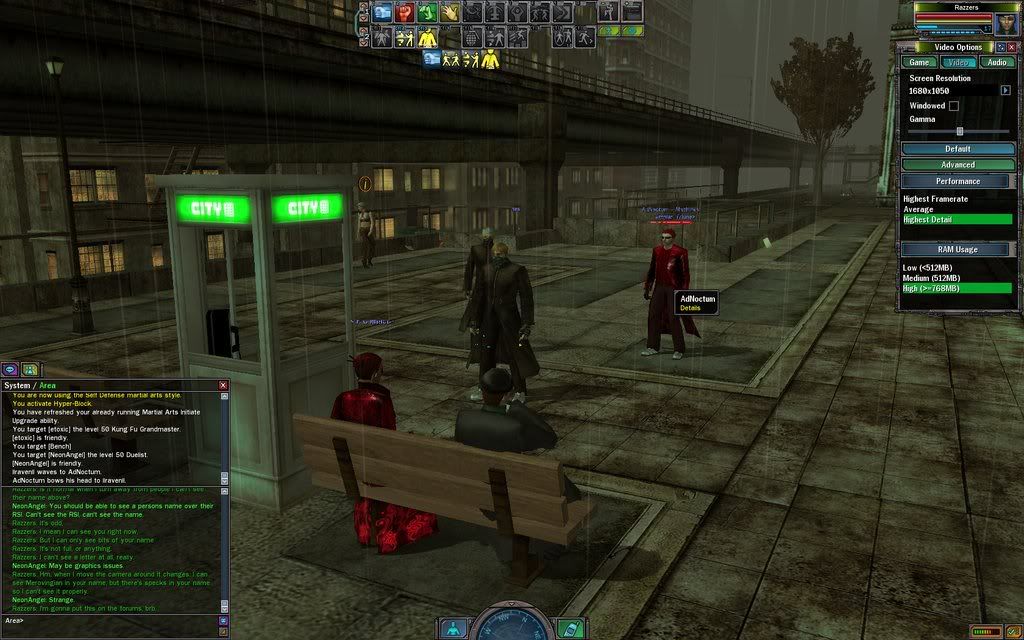
#3630047278506/29/2008 11:11:59Character names (Others and Myself) are broken.
As you can see, the names above characters' heads are all weird. When I move the camera they names change what's wrong with them, the space where they're weird.
Anyway, I'm not sure what to do, please help. I have the latest graphics driver update too, by the way.
#3630047278906/29/2008 11:30:47Re:Character names (Others and Myself) are broken.
I remember having this same issue under Vista x86. I know that it is related to anti-aliasing, but it was an on and off kind of problem. When I went and messed with settings it resurfaced, but it usually went away the next time I jacked in. I think this is because MxO has problems remembering to keep anti-aliasing enabled, and so would disable it the next time I jacked in. Try disabling anti-aliasing and see if that makes a difference.
I haven't had this problem at all yet under Vista x64, but I have entirely new hardware in this box. What kind of graphics card are you using?
#3630047279106/29/2008 11:36:25Re:Character names (Others and Myself) are broken.
I am using a... NVIDIA GeForce 7800 GS and my OS is XP.
#3630047279206/29/2008 11:38:18Character names (Others and Myself) are broken.
I've got the same problem, using a GeForce 6800. I don't know how to fix it entirely, but if you go into advanced video options, turn off presets, and turn off overbright and green tint, it should go away.
#3630047282106/29/2008 13:55:54Re:Character names (Others and Myself) are broken.
This happens sometimes when you force anti aliasing from the Nvidia control panel, instead of letting the application decide.
#3630047282306/29/2008 13:59:37Re:Character names (Others and Myself) are broken.
Just turn off your green tint in the advanced menu in options.
#3630047297206/29/2008 21:37:39Re:Character names (Others and Myself) are broken.
Kybutra wrote:
This happens sometimes when you force anti aliasing from the Nvidia control panel, instead of letting the application decide.
This is the correct answer. If you are in Vista tun off antialiasing in-game completely. under XP set the nVidia control panel antialias settings to "let the application decide"
#3630047301306/30/2008 01:33:00Re:Character names (Others and Myself) are broken.
Takara wrote:
I am using a... NVIDIA GeForce 7800 GS and my OS is XP.
#3630047301506/30/2008 01:35:29Re:Character names (Others and Myself) are broken.
I use a 6800 GS and use Xp as well
I played around in-game with this months ago, if you turn off green-tint, the problem is solved. Doesnt matter what setting you have in-game as long as you have green-tint off this wont happen.
P.S. Turn off overbright for better performance less lag.