Hardline Map Problem (continued)

9 posts · 2007-03-19 13:59:31 to 2007-03-25 20:38:57

#36300191117 03/19/2007 13:59:31 Hardline Map Problem (continued)

Ok, the hardline situation is getting worse.  I don't think I have a single hardline image that isn't messed up somehow.  Like so...
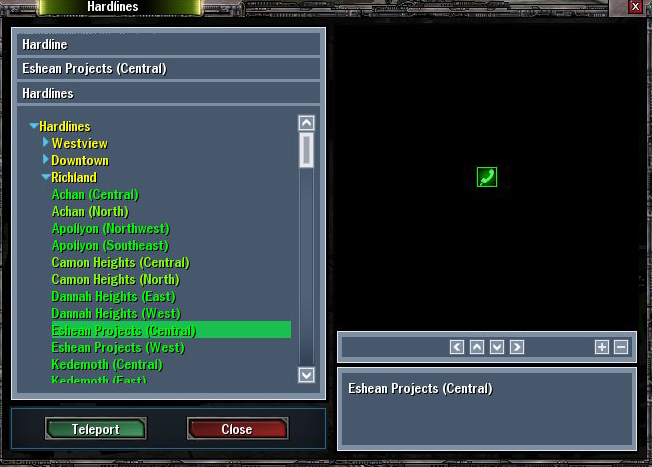
and
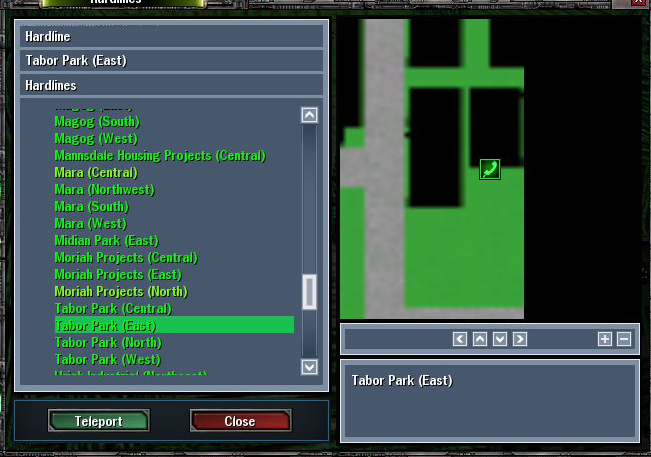
Since I haven't been able to find a fix for it so far, I'm thinking that the images for the hardlines is in the profiles folder, so if I just delete it, the patcher will replace it with a correct version, yes? 

Now, I just need to find the right file that controls this sort of thing.  I would go and delete everything in the profiles folder under my main, but I don't want my hotbar disapearing or anything else important.

I'm thinking that hl.cfg might be the file that stores this, but I'm not certain. 

So, my question is, does anybody know or is anybody willing to test it out?

#36300191136 03/19/2007 14:20:46 Re:Hardline Map Problem (continued)
Id think its eitehr your Gcard, or the file.
#36300191161 03/19/2007 14:54:43 Re:Hardline Map Problem (continued)

Yeah, but the pictures have been slowly vanishing over time.  The picture of Tabor Park East is old, it's now completely black.  Would my graphics card slowly make them disapear?  Or for that matter, would the file even do that?

#36300191260 03/19/2007 17:28:12 Re:Hardline Map Problem (continued)
It's probably the lag. Most of Recursion's hardlines are in the red now.
#36300192074 03/20/2007 13:23:08 Re:Hardline Map Problem (continued)
This would get a better response if posted in the Technical Help and Questions board.
#36300192113 03/20/2007 13:58:54 Re:Hardline Map Problem (continued)
I'd try running a full system check.. your packmaps may be corrupted somehow. Just as a trick, though, try renaming your /mxo/profiles/[stationname] folder to something else and logging to see if the .cfg files are messing with your UI at all.
#36300192914 03/21/2007 13:00:19 Re:Hardline Map Problem (continued)

Full system check did nothing.

Renaming the file and logging in fixed a couple of them but most of them are still screwed up.

#36300193127 03/21/2007 16:28:19 Re:Hardline Map Problem (continued)

That's a relatively strange one.  how does Zooming in or out on the map impact the problem?  How about when you click a district heading, like international for example, does it display the atlas looking version of the neighborhoods ok?

 Do you get the same problem with an alt?  If not, might indicate a problem with the profile.  Graphics requirement or the loading area is relatively low.  Weird how you say it got worse over time, how long ago did it start?

#36300196687 03/25/2007 20:38:57 Re:Hardline Map Problem (continued)
Huslah wrote:

That's a relatively strange one.  how does Zooming in or out on the map impact the problem?  How about when you click a district heading, like international for example, does it display the atlas looking version of the neighborhoods ok?

 Do you get the same problem with an alt?  If not, might indicate a problem with the profile.  Graphics requirement or the loading area is relatively low.  Weird how you say it got worse over time, how long ago did it start?


Sorry this took so long. 

Zooming out makes the problem go away, but it never stays zoomed out.  It always goes back to the zoomed in position where it's messed up.  District heading displays the atlas and everything looks ok with that, too. 

And I forgot to check to see if my alt has the same problems.  And it started almost a year ago and progressivley got worse.  One map got a little messed up, then another, then a little more messed up on the same one until alot of them are completely black now.