Mx0 ·· The balance of "options.cfg" and "useropts.cfg"

220 posts · 2006-06-03 10:36:33 to 2009-06-07 03:55:29

#11400028280 06/03/2006 10:36:33 Mx0 ·· The balance of "options.cfg" and "useropts.cfg"

Mx0 ·· "I am really surprised about the new 'options/useropts (cfg)' result

Hi dear mxo users and graphic lovers!

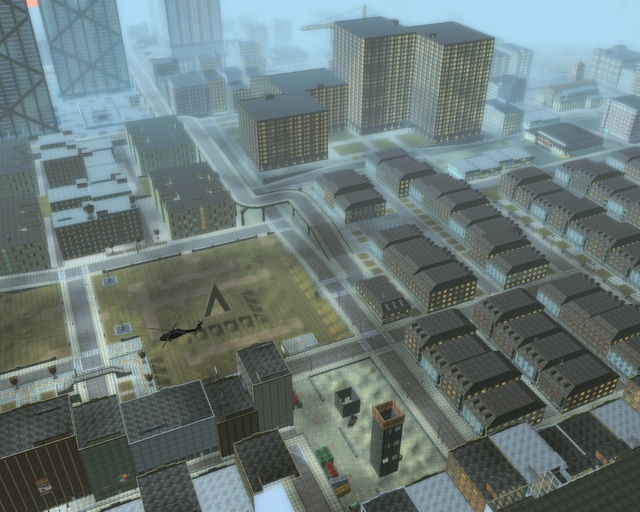
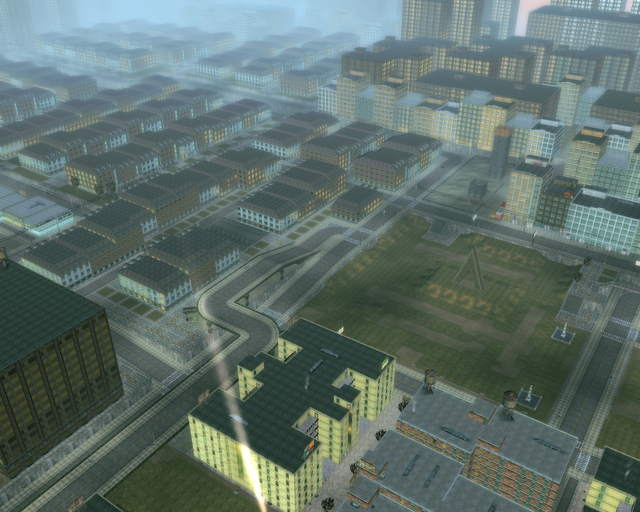
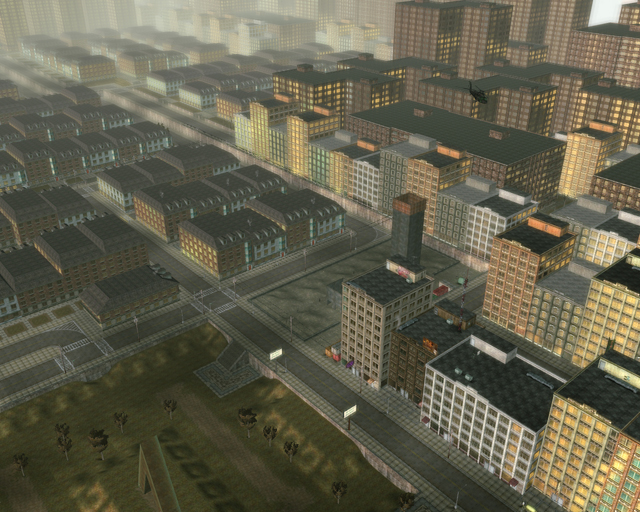
Okay, I read Bayamos thread, look always for new messages about 'useropts', but what I saw now is absolutely amazing. I wrote new 'options/useropts (cfg)' settings and can say, I haven't see such result on DN1 till now. Yes, I saw "Peer's" photos and saw his settings. "Peer's" photos are good of course, but they are at end not very realistic, cause he overdrive the settings and set them to a total maximum - His settings (values) lost their connections to each other, to set them to a maximum is not the perfect way. I did it mathematical and didn't tear the relations from the values apart, as they originaly are. Also some settings from "Peer" had a bad effect on the quality of the anti-aliasing. The problem is also this magical fog, which exist in the reality too, if we look far in distance, this blury fog exist, when you overdrive your 'useropts', you can see very far, but the pictures are not more realistic. I found the perfect balance between the best graphic and a good performance and have still a view in a very far distance.

I had not much time, so all photos were made by Arzu. I hope, you enjoy them, we did. If someone wants these 'options/useropts (cfg)' files you can ask Arzu or me over PM. The best graphic can't be made by 'useropts.cfg' only, settings in 'options.cfg' are necessary too, I will explain all in PM, if someone is interested. Enjoy some samples here:

[-]  "Oh and yes, of course it was nothing edited on these photos, thats mxo graphic only."
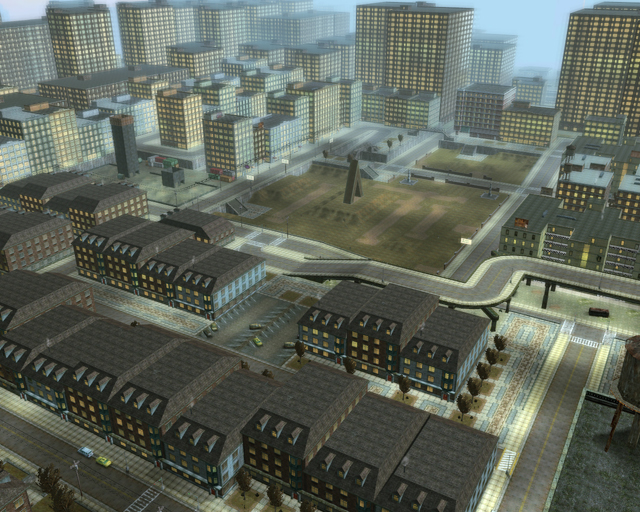


[•]  Here are the photos in their original resolution (1280x1024x24x72):

http://devx.ch/msbazman/mx/mxo/ss/ss023.jpg    http://devx.ch/msbazman/mx/mxo/ss/ss025.jpg    http://devx.ch/msbazman/mx/mxo/ss/ss026.jpg    http://devx.ch/msbazman/mx/mxo/ss/ss028.jpg

**  Here are more photos: 

http://devx.ch/msbazman/mx/mxo/ss/ss049.jpg    http://devx.ch/msbazman/mx/mxo/ss/ss048.jpg    http://devx.ch/msbazman/mx/mxo/ss/ss046.jpg    http://devx.ch/msbazman/mx/mxo/ss/ss043.jpg    http://devx.ch/msbazman/mx/mxo/ss/ss041.jpg    http://devx.ch/msbazman/mx/mxo/ss/ss038.jpg    http://devx.ch/msbazman/mx/mxo/ss/ss035.jpg    http://devx.ch/msbazman/mx/mxo/ss/ss032.jpg    http://devx.ch/msbazman/mx/mxo/ss/ss031.jpg    http://devx.ch/msbazman/mx/mxo/ss/ss030.jpg    http://devx.ch/msbazman/mx/mxo/ss/ss029.jpg    http://devx.ch/msbazman/mx/mxo/ss/ss027.jpg    http://devx.ch/msbazman/mx/mxo/ss/ss024.jpg    http://devx.ch/msbazman/mx/mxo/ss/ss022.jpg    http://devx.ch/msbazman/mx/mxo/ss/ss021.jpg    http://devx.ch/msbazman/mx/mxo/ss/ss020.jpg    http://devx.ch/msbazman/mx/mxo/ss/ss019.jpg    http://devx.ch/msbazman/mx/mxo/ss/ss018.jpg    http://devx.ch/msbazman/mx/mxo/ss/ss011.jpg    http://devx.ch/msbazman/mx/mxo/ss/ss010.jpg    http://devx.ch/msbazman/mx/mxo/ss/ss009.jpg    http://devx.ch/msbazman/mx/mxo/ss/ss006.jpg    http://devx.ch/msbazman/mx/mxo/ss/ss005.jpg    http://devx.ch/msbazman/mx/mxo/ss/ss004.jpg    http://devx.ch/msbazman/mx/mxo/ss/ss003.jpg    http://devx.ch/msbazman/mx/mxo/ss/ss002.jpg    http://devx.ch/msbazman/mx/mxo/ss/ss001.jpg    http://devx.ch/msbazman/mx/mxo/ss/ss000.jpg    http://devx.ch/msbazman/mx/mxo/ss/ss052.jpg    http://devx.ch/msbazman/mx/mxo/ss/ss051.jpg    http://devx.ch/msbazman/mx/mxo/ss/ss045.jpg    http://devx.ch/msbazman/mx/mxo/ss/ss044.jpg    http://devx.ch/msbazman/mx/mxo/ss/ss040.jpg    http://devx.ch/msbazman/mx/mxo/ss/ss039.jpg    http://devx.ch/msbazman/mx/mxo/ss/ss036.jpg    http://devx.ch/msbazman/mx/mxo/ss/ss034.jpg    http://devx.ch/msbazman/mx/mxo/ss/ss033.jpg    http://devx.ch/msbazman/mx/mxo/ss/ss053.jpg

bye



Ann Bazman
Bazman Sisters

#36300033402 08/25/2006 12:48:23 Re:Mx0 ·· The balance of "options.cfg" and "useropts.cfg" is the main thing

Can you share what system you are running?

I ran the settings arzu sent, and after a hour or so, things started to vanish.

#36300033413 08/25/2006 12:57:29 Re:Mx0 ·· The balance of "options.cfg" and "useropts.cfg" is the main thing
Wow.
#36300033422 08/25/2006 13:17:29 Re: Mx0 ·· The balance of "options.cfg" and "useropts.cfg" is the main thing

Mx0 ·· "PC Config - Answer 001

Hi Bhurn!

Ah yes, Bhurn still waits for a special optimized file, a softer version. Good point, for all those with a slowly computer, I can send a light version. You will not have the same far distance for the view, but it will still make a big difference to the original mxo settings - you will still see more far and in a better quality as before. With these new settings you have never again this "pixel-stairs-effect", every line is absolutely clean, even then when you zoom 25 cm away from your face. Its fantastic.

[•]  I have a simple PC:  1 GB RAM and 128 MB VRAM (video card)

bye

#36300033475 08/25/2006 14:41:24 Re:Mx0 ·· The balance of "options.cfg" and "useropts.cfg" is the main thing
Thank you ann
#36300033564 08/25/2006 16:55:03 Re:Mx0 ·· The balance of "options.cfg" and "useropts.cfg" is the main thing
That's wicked.
#36300033588 08/25/2006 20:10:57 Re:Mx0 ·· The balance of "options.cfg" and "useropts.cfg" is the main thing
SHES A CRAZY HACKER I TELL YOU!!! CRAZY!!!

By the way Ann thank you for the fileSMILEY
#36300033711 08/26/2006 04:24:25 Re:Mx0 ·· The balance of "options.cfg" and "useropts.cfg" is the main thing
I wouldn't mind a few choice files... SMILEY

- Void
Recursion: n - See Recursion.
Void's Sig
#36300033714 08/26/2006 04:34:22 Re:Mx0 ·· The balance of "options.cfg" and "useropts.cfg" is the main thing
Christ...

How long can you run that before timing out?
#36300033747 08/26/2006 05:47:39 Re:Mx0 ·· The balance of "options.cfg" and "useropts.cfg" is the main thing
This settting was actually first discovered by Peer, but its my understanding that if you aren't running at least 2 gig of RAM your vid card has a high probability melting if you use these settings for extended periods of play. But its a fantastic setting, shows off the sheer magnitude of the MxO world.
#36300033748 08/26/2006 05:52:22 Re: Mx0 ·· The balance of "options.cfg" and "useropts.cfg" is the main thing

Mx0 ·· "Timing Out - Answer 001

@ PBlade

Jesus, you ask things sometimes. To be ownest, I have no idea which 'timing out' you mean, hehe. Please tell me exactly about the 'timing out', I would like to answer. From here I can only say there is no 'timing out' limitation or something with time.

bye

Ann Bazman  · "annbazman" · «CONSTANCIA» · <TOPKAPI>

#36300033751 08/26/2006 06:03:00 Re: Mx0 ·· The balance of "options.cfg" and "useropts.cfg" is the main thing

Mx0 ·· "Timing Out - Answer 001

@ PBlade

Forget the past message, now I know what you talk about. The answer is 'no'. The key is, not to overdrive the settings and keep all relations to each other as they are in original. After it you can make exponential every version you like for a slow or a super pc. I use the exponent "x2" and I have no problems - only when I zoom out over the whole city, it is slowlier of course, but thats no problem for doing photography.

[•]  I have a simple PC:  1 GB RAM and 128 MB VRAM (video card) 

bye

Ann Bazman  · "annbazman" · «CONSTANCIA» · <TOPKAPI>

#36300033766 08/26/2006 07:04:28 Re:Mx0 ·· The balance of "options.cfg" and "useropts.cfg" is the main thing
Mm. Looks lovely...
I'd love a copy of those files, if you'd be so kind.

- Void
Recursion: n - See Recursion.
Void's Sig
#36300033767 08/26/2006 07:05:50 Re:Mx0 ·· The balance of "options.cfg" and "useropts.cfg" is the main thing
... And posting this message has made my older one show up again.
I loathe these forums and their lack of an edit button...

- Void
Recursion: n - See Recursion.
Void's Sig
#36300033801 08/26/2006 08:29:18 Re: Mx0 ·· The balance of "options.cfg" and "useropts.cfg" is the main thing

MXO - "options.cfg" - Answer 001

Hi Traxada! 

Trax wrote:

This settting was actually first discovered by Peer, but its my understanding that if you aren't running at least 2 gig of RAM your vid card has a high probability melting if you use these settings for extended periods of play.

That is in real not true, Ann plays with these "options.cfg" since longer time, but she dared to write about manipulating other files than "useropts.cfg" in forums, somewhere is written it were forbidden. But at end we said, if someone would punish us for making the matrix better, we would like to be banned for that. Ann and her paranoia, at begin she even wanted that noone knows her real name and that she is my sister. I even think, that many users made configurations on these other files. Peer was the first who posted it, thats all. And yes, Peer's settings would kill my PC too, but to overscrew the useropts that much is not necessary. Ann has other settings than him and thats why these config runs well and don't kill your PC. And there is something in Peer's file that had in our case a bad influence for the best anti-aliasing result. To say is also these files generates the maximum in graphic, but it is optimized for different distances - means if we say the border is on 500'000'000 units, then we want have everything from the scenery, all objects, every possible thing till to this border and in the best quality which is possible, of course (no limitations). Nothing is reduced, everything must be visible. But...  ...if someone has a slower pc, the distance must be shorter, but also here with no limitations, all must be visible, every object, every detail. Ann made different versions for different PC power.

ciao

Arzu Bazman  // [arzubazman] // «CONSTANCIA» // <TOPKAPI>

#36300033852 08/26/2006 10:11:39 Re:Mx0 ·· The balance of "options.cfg" and "useropts.cfg" is the main thing
I wouldnt mind haveing these files...
#36300033874 08/26/2006 11:19:04 Re:Mx0 ·· The balance of "options.cfg" and "useropts.cfg" is the main thing

And why not just post the config lines?

As far i can tell its just messing with these:

#dl_slod_initloadradius = 1000
#dl_slod_prefetchradius = 12500
#dl_sid_prefetchradius = 70000
#dl_nav_prefetchradius = 35000
#dl_ext_prefetchradius = 50000
#dl_prop_prefetchradius = 12500
#dl_sidi_prefetchradius = 5000
#dl_int_prefetchradius = 4000
#wr_extfardist = 50000
#wr_exttointdist = 2500
#wr_extobjfardist = 20000
#wr_propfardist = 12500
#wr_propfadedist = 3000
#wr_slodfardist = 220000
#wr_skybox_fogrim_fogdst = 70000
#wr_fogfardist = 70000
#exteriorcamerafarz = 46000
#camerafarz = 46000
#interiorcamerafarz = 12000

Or am i missing something?

#36300033875 08/26/2006 11:20:23 Re:Mx0 ·· The balance of "options.cfg" and "useropts.cfg" is the main thing

Oh and lets not forget the almighty

WR_PrefabLODEnable = 0

#36300033877 08/26/2006 11:23:31 Re:Mx0 ·· The balance of "options.cfg" and "useropts.cfg" is the main thing

Seems all you did was keep the values at their original relationships but with a multiplier thrown in.

Again, or am i missing something?

Oh and blast the lack of edit...

#36300033886 08/26/2006 11:55:31 Re: Mx0 ·· The balance of "options.cfg" and "useropts.cfg" is the main thing

Mx0 ·· "Long Fight

Hi CW!

clodewolf wrote:

    Oh and lets not forget the almighty

    WR_PrefabLODEnable = 0

Yes, that almighty setting, for which I fighted soooo long (1.5 month), that they set it back from admin setting to a normal one, I asked 100 ppl to help me, to find out the distances, this 300 units texture quality reducing made me totaly sick.

No, somewhere is written, we can only manipulate "useropts.cfg", no other files, I don't post it, only over pm or email.

bye

Ann Bazman  · "annbazman" · «CONSTANCIA» · <TOPKAPI>

#36300033890 08/26/2006 12:06:43 Re:Mx0 ·· The balance of "options.cfg" and "useropts.cfg" is the main thing

Ah ok, well for anyone who was curious, the lines that i posted above (the ones Peer and Bazman are using) need to be in Options.cfg since it invalidates the ones you put in Useropts.

Simple really.

#36300033893 08/26/2006 12:10:30 Re:Mx0 ·· The balance of "options.cfg" and "useropts.cfg" is the main thing

Of course editing anything outside of Useropts (even the, weirdly enough purely user manipulated anyway, options.cfg file) is against some sort of rule somewhere.

So don't do it. SMILEY

#36300034271 08/27/2006 03:05:16 Re: Mx0 ·· The balance of "options.cfg" and "useropts.cfg" is the main thing

MXO - "SAT Observation"

Hi Annie! 

I love this one, if I had (4 GB RAM), I would start MXO SAT Cartography, heehee.


ciao

Arzu Bazman  // [arzubazman] // «CONSTANCIA» // <TOPKAPI>

#36300034281 08/27/2006 04:01:13 Re: Mx0 ·· The balance of "options.cfg" and "useropts.cfg" is the main thing
arzubazman wrote:

MXO - "SAT Observation"

Hi Annie! 

I love this one, if I had (4 GB RAM), I would start MXO SAT Cartography, hihi.


   That's actually something I've wanted to see if it was possible.
#36300034286 08/27/2006 04:22:54 Re: Mx0 ·· The balance of "options.cfg" and "useropts.cfg" is the main thing

MXO - "SAT Observation"

Hi Othinn1! 

You mean you wanted see MXO SAT Photos or MXO with (4GB RAM), hehe?

[] 

Sorry, if this post looks somehow strange. I try new ways how to keep the text formatting when I copy/paste it. Since the Forum Software changed, it is not possible to copy/paste with HTML formatting, the colors and font sizes get lost.

[]

ciao

Arzu Bazman  // [arzubazman] // «CONSTANCIA» // <TOPKAPI>


#36300034304 08/27/2006 05:08:41 Re:Mx0 ·· The balance of "options.cfg" and "useropts.cfg" is the main thing
Arzu,

I tried it myself, it's simply amazing. Things look alot better, and the preformance is still good. Altho since I'm connected to a Router, it slows down a lil bit, but still..
#36300034337 08/27/2006 06:23:24 Re:Mx0 ·· The balance of "options.cfg" and "useropts.cfg" is the main thing

Pretty sure this was Ann's work. SMILEY

#36300034421 08/27/2006 10:35:46 Re: Mx0 ·· The balance of "options.cfg" and "useropts.cfg" is the main thing
arzubazman wrote:

MXO - "SAT Observation"

Hi Othinn1! 

You mean you wanted see MXO SAT Photos or MXO with (4GB RAM), hehe?


   Oh, sorry.  I meant the sat photos.  I'm sure MxO with 4GB RAM is absolutely possible. ^_^;
#36300036992 08/30/2006 21:44:25 Re:Mx0 ·· The balance of "options.cfg" and "useropts.cfg" is the main thing
Thanks for the links ann.

Just for the hell of it, I tried out her max x2.00 settings just to see what it would look like.

MY GOD! Was it beautiful! Sure, I was running at 2 - 4 FPS, but still, at least it looked great. SMILEY

But I was expecting this, considering I still have my old 128MB Radeon x300SE. However, I was wondering if anyone knows how good of a graphics card I would need to be able to play decently at these awesome settings?

Right now I have a 3.4GHz Pentium, and 2GB of DDR RAM. So my only real weak spot is the graphics card.

I've been cinsidering getting an x1600 Pro from Best Buy. Would this handle it, or do I need to go higher? I'll set my budget ceiling at $250 if you guys can suggest anything better. Note that I'd prefer a Radeon, so as to avoid the hassle of converting my computer to accept nVideas.

Sorry for asking for help like this, but I'm still getting into this whole PC perfoamance thing, and when I buy a new graphics card, I really want to make it last. SMILEY

Thanks,
Steege
#36300037006 08/30/2006 22:18:55 Re:Mx0 ·· The balance of "options.cfg" and "useropts.cfg" is the main thing
Steege wrote:
Thanks for the links ann.

Just for the hell of it, I tried out her max x2.00 settings just to see what it would look like.

MY GOD! Was it beautiful! Sure, I was running at 2 - 4 FPS, but still, at least it looked great. SMILEY

But I was expecting this, considering I still have my old 128MB Radeon x300SE. However, I was wondering if anyone knows how good of a graphics card I would need to be able to play decently at these awesome settings?

Right now I have a 3.4GHz Pentium, and 2GB of DDR RAM. So my only real weak spot is the graphics card.

I've been cinsidering getting an x1600 Pro from Best Buy. Would this handle it, or do I need to go higher? I'll set my budget ceiling at $250 if you guys can suggest anything better. Note that I'd prefer a Radeon, so as to avoid the hassle of converting my computer to accept nVideas.

Sorry for asking for help like this, but I'm still getting into this whole PC perfoamance thing, and when I buy a new graphics card, I really want to make it last. SMILEY

Thanks,
Steege

Honestly I don't think there even exists good enough hardware today to run on those settings smoothly. You'd have to wait some time before getting that kind of hardware.
#36300037015 08/30/2006 22:37:27 Re:Mx0 ·· The balance of "options.cfg" and "useropts.cfg" is the main thing
Hmm...I wonder if I should give it a shot with my Core 2 Duo and Geforce 7950 GX2...
#36300037360 08/31/2006 08:14:05 Re:Mx0 ·· The balance of "options.cfg" and "useropts.cfg" is the main thing
Excellent!
We had to change the resolution though, no way we are running at 1024 x 768.
Other than that, it was amazing. Thanks for sharing.
#36300038168 09/01/2006 00:09:18 Re:Mx0 ·· The balance of "options.cfg" and "useropts.cfg" is the main thing

Here's the skinny on Useropts.cfg versus Options.cfg:...

Options.cfg is a file that gets overwritten occasionally (if a setting is changed by the devs for a patch) so nothing in there is safe from getting erased.

Useropts.cfg is loaded after options.cfg and it's settings override the settings in options.cfg.

Any settings in Useropts.cfg should be all you need, however I think the client only loads certain "Dev. only" settings from Options.cfg as the user is not meant to edit them.

Unless you find an exploit that gives you an unfair advantage by modifying these files, there should be no repercussions from SOE. These files are readily editable by users. Reverse compiling and changing the game code is the big no-no.

And Arzu... Just because you're paranoid, doesn't mean they aren't after you. SMILEY

phiAU - The Kings of Never - noblesse oblige
#36300038453 09/01/2006 09:06:00 Re: Mx0 ·· The balance of "options.cfg" and "useropts.cfg" is the main thing

MXO - "options.cfg" and "useropts.cfg"

Hi phi! 

Hihi, thats not me who is so paranoid, thats the sunshine Annie, who you think at. I am the opposite of that and had my bad experiences yet, because of that and my open kind.

I am not sure, but I meant absolutely the same like you about the "options.cfg" and "useropts.cfg". Ann told me, there are some settings which "useropts.cfg" can't hold constantly. I tested it, and I put all these special tags from "options.cfg" in "useropts.cfg" and it doesn't work, the quality is not more the same.

[]  I place some samples, when I come home this night

ciao

Arzu Bazman  // [arzubazman] // «CONSTANCIA» // <TOPKAPI>

#36300038758 09/01/2006 15:07:34 Re:Mx0 ·· The balance of "options.cfg" and "useropts.cfg" is the main thing

This is an interesting claim, im still a little weary on the options.cfg file but i just use the ones that other people have certified as working and "safe". This looks like something i could benifit from as i already have got some "enhanced" settings but i would like to see a little better preformance as sometimes it can stick or be laggy which is unfortunate.

If you could send me a copy of the best (highest) options that i could try out, thanks Kindeller

#36300040271 09/03/2006 14:23:12 Re: Mx0 ·· "options.cfg" and "useropts.cfg" (more photos)

MXO - "options.cfg" and "useropts.cfg"

Hi phi! 

I made some new photos from the city (Richland) and a RSI photo from my face to show the quality and these absolute clean lines and curves. As I told in this thread yet, these all are pictures direct from MXO screenshot function, nothing was edited, no afterrendering was made (clean, naked images out of MXO).

[]  I place next samples from Downtown and Westview soon.

[+]  Here are all photos in their original resolution 1280x1024x24x72

http://devx.ch/msb...s054.jpg    http://devx.ch/msb...s055.jpg    http://devx.ch/msb...s056.jpg    http://devx.ch/msb...s057.jpg    http://devx.ch/msb...s058.jpg    http://devx.ch/msb...s059.jpg    http://devx.ch/msb...s060.jpg    http://devx.ch/msb...s061.jpg    http://devx.ch/msb...s062.jpg    http://devx.ch/msb...s063.jpg

ciao

Arzu Bazman  // [arzubazman] // «CONSTANCIA» // <TOPKAPI>

#36300040291 09/03/2006 14:46:15 Re:Mx0 ·· The balance of "options.cfg" and "useropts.cfg" is the main thing

Simply amazing, please pm how you get these results what your settings are..

#36300040347 09/03/2006 16:35:37 Re:Mx0 ·· The balance of "options.cfg" and "useropts.cfg" is the main thing
Looking Nice, cant wait to see if I can get this to work on mine.
Mind PMing me the Settings for these?

Regards,
Shaun
Photobucket
#36300040355 09/03/2006 16:44:24 Re:Mx0 ·· The balance of "options.cfg" and "useropts.cfg" is the main thing
Wow! Please could you send me a copy of your Useropts.cfg and your Options.cfg files!
#36300040576 09/03/2006 22:48:33 Re:Mx0 ·· The balance of "options.cfg" and "useropts.cfg" is the main thing
... And, I think my settings got overwritten, somehow.

Do you think I could trouble you lovely ladies for those files, one more time?

I promise not to destroy them, this time. Honestly.

- Void
Recursion: n - See Recursion.
Void's Sig
#36300040774 09/04/2006 04:59:45 Re:Mx0 ·· The balance of "options.cfg" and "useropts.cfg" is the main thing
EndlessVoid wrote:
... And, I think my settings got overwritten, somehow.

- Void

Omg Noz!
It's Smith!
Hurry, Void! Return your settings to the source!
#36300040795 09/04/2006 05:57:01 Re:Mx0 ·· The balance of "options.cfg" and "useropts.cfg" is the main thing
Pfft. The last time I returned anything to the Source...
... You know, I don't think I've ever returned anything to the Source.

- Void
Recursion: n - See Recursion.
Void's Sig
#36300046204 09/10/2006 22:47:54 Re: Mx0 ·· The balance of "options.cfg" and "useropts.cfg"

MXO - "options.cfg" and "useropts.cfg"

Hi all! 

I made some new photos from our lovely city and some RSI photos with a fantastic quality. All pictures are made with the MXO screenshot function only, nothing was edited, no afterrendering was made.

[]  I place next samples from "org" constructs.

[+]  Here are more photos in their original resolution 1280x1024x24x72

http://devx.ch/msb...s064.jpg    http://devx.ch/msb...s065.jpg    http://devx.ch/msb...s066.jpg    http://devx.ch/msb...s067.jpg    http://devx.ch/msb...s068.jpg    http://devx.ch/msb...s069.jpg    http://devx.ch/msb...s070.jpg    http://devx.ch/msb...s071.jpg    http://devx.ch/msb...s072.jpg    http://devx.ch/msb...s073.jpg    http://devx.ch/msb...s074.jpg    http://devx.ch/msb...s075.jpg    http://devx.ch/msb...s076.jpg    http://devx.ch/msb...s077.jpg    http://devx.ch/msb...s078.jpg    http://devx.ch/msb...s079.jpg    http://devx.ch/msb...s080.jpg    http://devx.ch/msb...s081.jpg    http://devx.ch/msb...s082.jpg    http://devx.ch/msb...s083.jpg    http://devx.ch/msb...s084.jpg    http://devx.ch/msb...s085.jpg    http://devx.ch/msb...s086.jpg    http://devx.ch/msb...s087.jpg    http://devx.ch/msb...s088.jpg    http://devx.ch/msb...s089.jpg    http://devx.ch/msb...s090.jpg    http://devx.ch/msb...s091.jpg

ciao

Arzu Bazman  // [arzubazman] // «CONSTANCIA» // <TOPKAPI>

#36300046219 09/10/2006 23:33:00 Re:Mx0 ·· The balance of "options.cfg" and "useropts.cfg" is the main thing
Your Crazy Arzu, you know that? SMILEY Lovely pictures though.
#36300047359 09/12/2006 08:08:36 Re: Mx0 ·· The balance of "options.cfg" and "useropts.cfg" is the main thing

Mx0 ·· The balance of "options.cfg" and "useropts.cfg" 

Hi all!

I wanted let you know, if someone has still problems with the performance, after loading my "cfg" files, I can send you a new file a (x1.00+) version. The graphic quality is absolutely same, only the far view distance is not higher like in other files, the distance is like the original mxo settings, as they were made from the devs. This is the only difference between the files (x1.00+), (x1.25), (x1.50), (x2.00). In short words: All files higher then (x1.00+) are the best graphic quality and extended far view distance, and (x1.00+) has the best graphic quality and the same far view distance as the original mxo setting, as it was after a fresh install.

[]  I have a simple PC:  1 GB RAM and 128 MB VRAM (video card). I use (x1.25) for normal mxo playing and (x2.00) for photography.

bye

Ann Bazman  · "annbazman" · «CONSTANCIA» · <TOPKAPI>

#36300047363 09/12/2006 08:12:08 Re:Mx0 ·· The balance of "options.cfg" and "useropts.cfg" is the main thing
It's strange, I'm running with x2.00, and all my usual options (plus a few extras now oddly enough!) and I have no drop in fps!
#36300047946 09/12/2006 22:06:27 Re:Mx0 ·· The balance of "options.cfg" and "useropts.cfg" is the main thing
DragonStorm wrote:
It's strange, I'm running with x2.00, and all my usual options (plus a few extras now oddly enough!) and I have no drop in fps!

What are your computer specs?! I was running 2 - 4 fps and crashed after 5 minutes at the 2.00 settings. SMILEY
#36300048147 09/13/2006 08:58:41 Re:Mx0 ·· The balance of "options.cfg" and "useropts.cfg" is the main thing
Turn off ped density and UI lighting ans UI transparency. They are less than necessary if you want to take ariel pics.
#36300048160 09/13/2006 09:34:27 Re:Mx0 ·· The balance of "options.cfg" and "useropts.cfg" is the main thing
Steege wrote:
DragonStorm wrote:
It's strange, I'm running with x2.00, and all my usual options (plus a few extras now oddly enough!) and I have no drop in fps!

What are your computer specs?! I was running 2 - 4 fps and crashed after 5 minutes at the 2.00 settings. SMILEY


Athlon 2Gz, 1GB and a GeForce 6200 256mb.
#36300048162 09/13/2006 09:38:12 Re:Mx0 ·· The balance of "options.cfg" and "useropts.cfg" is the main thing
*curses the lack of edit button*

I usually run with shadows off mind you, just because they do slow my game down,. The x2.00 cfg files don't seem to make much of a difference in fps, shadows or otherwise, though.

But I still manage to keep everything else on max/high at 1600x1200, and I get a good 30-40fps most of the time.

I drop down in heavy PvP, although again, that's nothing to do with the x2.00, that's just normal.