Lightning Tutorial

15 posts · 2006-05-13 01:26:48 to 2006-05-14 10:17:42

#11400024902 05/13/2006 01:26:48 Lightning Tutorial
1. Open the photo/image you want the lightning to be on.
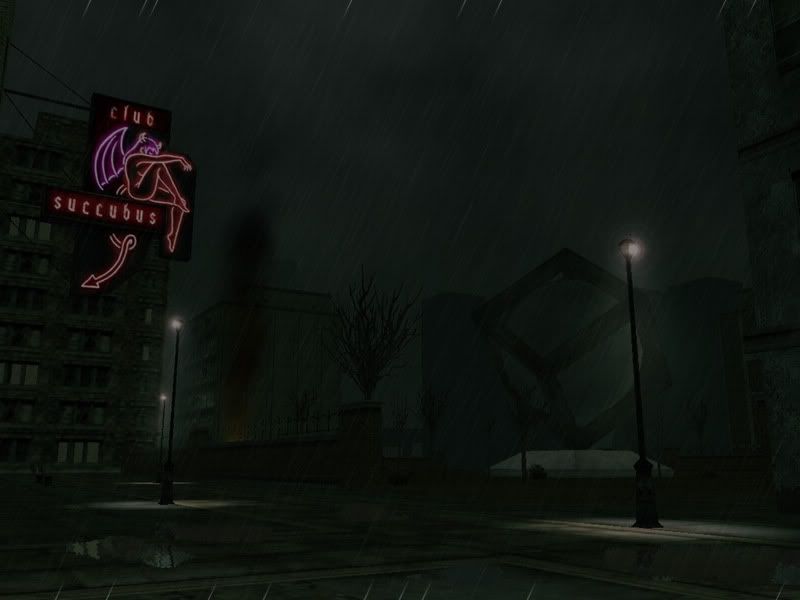


2. Create another layer. Select the Gradient tool (G). Bring up the Gradient picker and choose the Foreground to Background gradient. Then click and drag the gradient tool from a quarter from the left side of  your image all the way to the right.


3. Choose Filter/Render/Difference cloud. This will create a black lightning pattern. Press Command-I or CTRL-I (PC) to invert the cloud. Reapply this step as needed until you get the lightning effect you wanted.
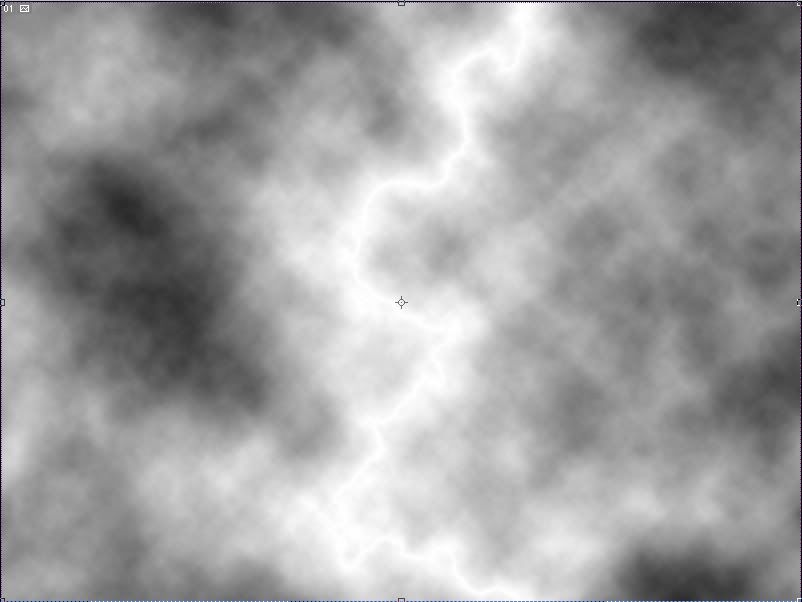


4. On the layers palette, change the blend mode from Normal to Screen. Select Image/Adjustments/Levels to change the level. Slide the center Input levels (midtones) slider all the way to the right. Now slide the left Input level slider towards the right and watch the lightning appear the way you like it. Press enter.
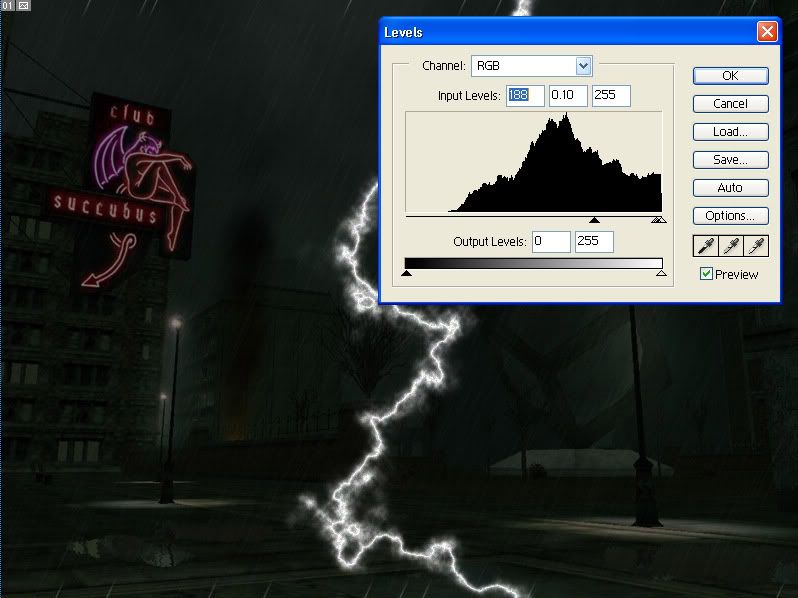


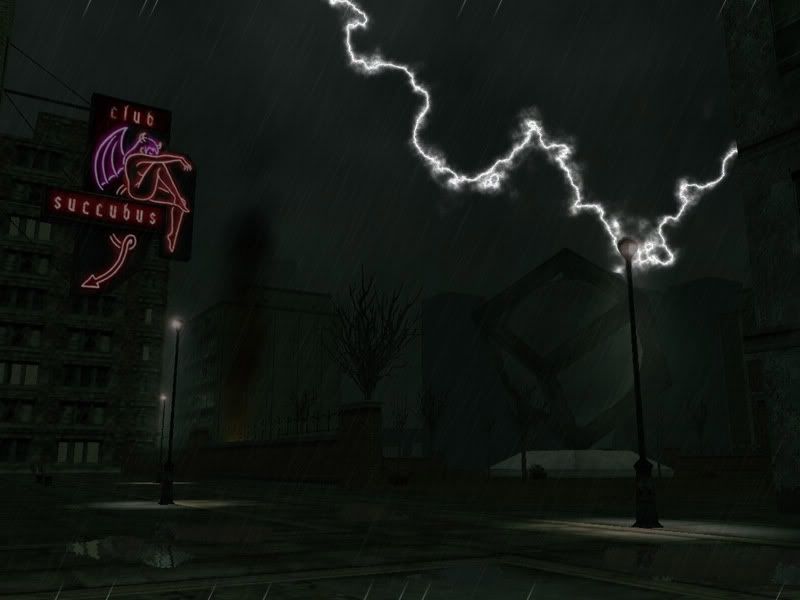
5. Resize, position, and edit to where you want the lightning to be located. Please note that if any part of the lightning is touching  any foreground object (lamppost and the side wall) unless you specifically wanted it to be part of the foreground, then you need to erase parts of the lightning to show your foreground objects. Now you have just finished the lightning tutorial. Enjoy.

#11400024912 05/13/2006 02:33:21 Re: Lightning Tutorial

Nice Mantra, but honestly theres lots of tutorials on the net for things like this, and linkage would be more appropriate SMILEY


This lighnting tutorial enchances the image just a little more SMILEY

#11400024916 05/13/2006 02:36:58 Re: Lightning Tutorial
True there Aqua, but still....


Thank you SMILEY The Image stays SO much Better SMILEY

#11400024917 05/13/2006 02:38:34 Re: Lightning Tutorial
a picture says a thousand words especially if u c  one being used from the game it givs u an idea on how the teqniq can b used
#11400024927 05/13/2006 04:05:18 Re: Lightning Tutorial


neo said:

whoah


/agree


Great work!


DevilsArms
#11400024991 05/13/2006 13:12:22 Re: Lightning Tutorial

I found one very similar to these not long ago... same basic process, but both of the tutorials posted here are way better than the one I found  SMILEY


Thanks much for posting this  SMILEY

#11400025005 05/13/2006 16:22:09 Re: Lightning Tutorial


Aquatium wrote:

Nice Mantra, but honestly theres lots of tutorials on the net for things like this, and linkage would be more appropriate SMILEY


This lighnting tutorial enchances the image just a little more SMILEY


What a silly reply, Aqua. To be honest, there are tutorials for *every* effect that has ever been tutorialized on these forums. Believe me, I've seen them. But that doesn't make any of the player-made tutorials any less valid or deserving to be posted here, especially because they were created by players and use game-related images. Those tutorials truly belong in the RSI forum, not just links to tutorials found elsewhere on the net.
#11400025008 05/13/2006 17:47:26 Re: Lightning Tutorial


Venatrix. wrote:


What a silly reply, Aqua.


Back at ya Ven.


I appriciate Mantra for making this, as I'm sure do others. I just feel in my own opinion that some tutorials are already in existance and would serve more useful if all linked together, infact on that note, ill search around for mixture of good tutorials and then post them in a thread, serving as a central resource.


However there are things which even though exist on the web, then only really help people here when shown with actual in game images, I understand that too.

#11400025009 05/13/2006 18:00:57 Re: Lightning Tutorial


Aquatium wrote:


Venatrix. wrote:


What a silly reply, Aqua.


Back at ya Ven.


infact on that note, ill search around for mixture of good tutorials and then post them in a thread, serving as a central resource.No


No need too. CooliceT submitted a shi t load of tutorial links from a ton of programs, not just Photoshop. You can find the link to his thread via my stickied thread. Really good sites he has listed.

Message Edited by PascaI on 05-13-2006 07:01 PM

#11400025011 05/13/2006 18:04:46 Re: Lightning Tutorial
Ah yes, that was a really good Post by Coolice, I hope lots of people check them out SMILEY
#11400025027 05/13/2006 21:21:01 Re: Lightning Tutorial


Aquatium wrote:

I appriciate Mantra for making this, as I'm sure do others. I just feel in my own opinion that some tutorials are already in existance and would serve more useful if all linked together, infact on that note, ill search around for mixture of good tutorials and then post them in a thread, serving as a central resource.


However there are things which even though exist on the web, then only really help people here when shown with actual in game images, I understand that too.


I understand your point too Aquatium, its just that I've seen a few artwork here with lightning that are slightly dull and not bright enough. Yeah, the lightning brushes are kewl but it doesn't have that natural look to it. also i got this tut from "Photoshop: Classic Effects" book that I was reading. the'yre pretty much the same tho. :smileywink::smileywink:

#11400025071 05/14/2006 06:36:09 Re: Lightning Tutorial


mantis777 wrote:
Yeah, the lightning brushes are kewl but it doesn't have that natural look to it.


Don't worry about it. Brushes are for lazy "artists" anyway who like to make artwork by stamping someone else's design all over their image.
#11400025072 05/14/2006 07:05:19 Re: Lightning Tutorial


Venatrix. wrote:


mantis777 wrote:
Yeah, the lightning brushes are kewl but it doesn't have that natural look to it.


Don't
worry about it. Brushes are for lazy "artists" anyway who like to make
artwork by stamping someone else's design all over their image.


*Hides blood brush set*
#11400025085 05/14/2006 09:36:13 Re: Lightning Tutorial
Oh, sweet.  I've been wanting to do lightning for a while now.  Thank you.
#11400025086 05/14/2006 10:17:42 Re: Lightning Tutorial

GGGGRRRRrrrrr...stupid error..god that was a paragraph i just lost..


anyway... i just downloaded the free trial of the PS CS2(?) so i could try this..(i cant get seriph's photosmart to do it, but them im using a free vers.) not only is it cool to see how it's done by you, its realy cool to do it yourself. AND you use an image that, not only is from the game, but; it's an image we have seen before. it's cool to see the progression on an image like that..

  thanks, and nice job..two thumbs up...


Message Edited by canadon on 05-14-2006 02:17 PM