I have a Nostromo Speedpad n52 left hand game controller. It connects via USB. My Windows XP taskbar has a Safely Remove Hardware option. Upon Stopping Nostromo n52 HID Speedpad 2.0 and Nostromo n52 HID Speedpad 2.0 Mouse Wheel and then unplugging the USB my computer goes to a blue screen.
I'd like to be able to remove and connect the nostromo without having to reboot the computer. I've run a few searches and checked Belkin.com support for hints but I can't find anything that will solve my problem. I have found some things that lead me to believe that the HID in the taskbar should not even be there for the nostromo.
Any input?
Two years of living the dream... and interpreting it! ~Variel
The speed pad is USB but does not conform to the standards properly (no real surprise... it IS Belkin) try removing it without selecting "safely remove hardware". It seems the driver tries to stop itself when you remove the hardware, even if windows has already stopped the device. It's this unmounting an non-mounted device that gives you the BSOD.
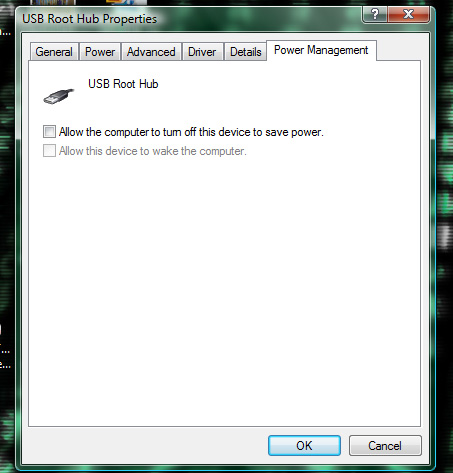
Also in the device properties (accessed via the device manager) turn off the "Allow the computer to turn off this device to save power." option on the Power Management tab.
Thanks for the help, Phi. It turns out closing the Nostromo software program and just pulling the USB plug disconnects without a problem. Simple solution FTW.
A follow up question:
"Also in the device properties (accessed via the device manager) turn off the "Allow the computer to turn off this device to save power." option on the Power Management tab."
I can't find the command to turn it off. Here is what it looks like with my Win XP...
Am I looking in the right place for the Power Management tab?
Thanks again!
Two years of living the dream... and interpreting it! ~Variel
with the nostromo i wouldnt say you need to turn it off to save power, and unless you specifically use the nostromo software, dont run it, just use the drivers, without the "unneeded" software it shouldnt be a problem. I love the nostromo and cant wait to get the n52te !!! however you may use the nostromo software but i never have and cant even remember what it does
I know there is a mapping program and a "profile" program to assign different maps to different games. I always close the Loadout Manager and select the profile by right clicking on the icon in the taskbar. I only refer to the mapping program when I want to change my controls, but I haven't made any changes in years.
Two years of living the dream... and interpreting it! ~Variel
nanofiggisremo... I wasn't saying turn it off to save power... I was saying to disable the option if it is there... but it isn't so nevermind. Some USB devices aren't fully standards compliant.
I know it's Vista but this bit is the same as XP... here's what I was talking about:
I have a Logitech G11 keyboard (inb4 G15... that little display might look cool but all it does is use system resources and give feedback I don't need) to give me those customisable buttons. single button emotes FTW... not to mention macros that don't take up hotbar slots
I have a G11 keyboard to give me those customisable buttons. single button emotes FTW... not to mention macros that don't take up hotbar slots " width="15" height="15" />
ooo. sounds nice. Thanks for the info, my friend.
Two years of living the dream... and interpreting it! ~Variel