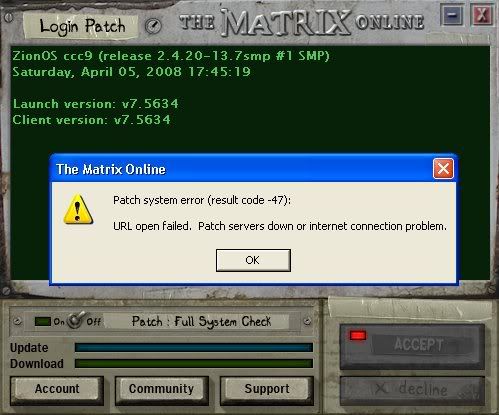
Recieved unexpected result code from Patcher (0). <solved>

9 posts · 2008-04-05 07:06:57 to 2008-04-05 15:57:54

#36300437509 04/05/2008 07:06:57 Recieved unexpected result code from Patcher (0). <solved>

I got that when i went to log in -.^

When you first open the launcher it starts up zionOS etc launch version, yours and then it stops and waits for a moment before displaying the above error...

cant do a full system check as the launcher doesnt get past the first screen :/ any ideas?

#36300437560 04/05/2008 09:53:01 Re:Recieved unexpected result code from Patcher (0).

Ok still no solution on it SMILEY

forgot to mention this happens after the wait and before the "unexpected result code from Patcher (0)"

I have internet (as you can see) and can find no other problems with my internet connection on my end (restarted router/modem several times aswell as restarting computer in various combinations)..

Any help appreciated (:

#36300437565 04/05/2008 10:09:33 Re:Recieved unexpected result code from Patcher (0).

If you are running Vista make sure you are executing the launcher as "Administrator".

As for the patch code error, if you havent been around in awile, there was a new update this week. It will need to be patched in. Just try the above and see if that works. if not, then im afraid you may need to try re-installing the game, sadly.  SMILEY

Hope this helps.


Photobucket - Video and Image Hosting


#36300437567 04/05/2008 10:10:09 Re:Recieved unexpected result code from Patcher (0).
I've had this before but unfortunatly I can't remember how I fixed it. However, if no one else comes up with an answer, I would suggest reinstalling the game. Life's a b****.
#36300437617 04/05/2008 12:15:19 Re:Recieved unexpected result code from Patcher (0).

Hmm well i wouldnt touch vista with a 10ft barge pole so its not an issue with vista. It was working last night up until around 3am (GMT)

I have a funny feeling it may be smething related to the fact i was messing with userops to try and fix indoor lag.. although i cant see the connection :/ Anyway after trying to get it to work i got stuck wit this problem.

As i said the issue has came up sometime overnight.... so :/

#36300437655 04/05/2008 14:40:50 Re:Recieved unexpected result code from Patcher (0).
I had this to and the problem lies withinin Internet Exlporer,
these are the steps i used here:

1. Goto you internet explorer and goto Tools or File and if there is a checkmark next to Work Offline click it and turn it off. Now answer the question. Yes or no!

Did it work?

If it didn't please continue to number 2.

2. Ok go back to the internet explorer and tell me does it load pages, any page?

If no than please continue.

3. Make sure you firewall isn't blocking Internet Explorer, is it?

If no then continue.

4. Also your firewall might be blocking launcher.exe from connecting to the internet or the patch site, goto your settings and check and for more firewall and ports help goto another topic i made: http://forums.station.sony.com/mxo/...mp;#36300413704

Was it blocking?  Did you unblock? Is it working?

If it still isn't working continue.

5. If you have a router please look on my guide topic: http://forums.station.sony.com/mxo/...mp;#36300413704

6. If five didn't work all i did was reformat my computer and reinstalled the client and it worked, but you probably shouldn't if you don't want to.


*edited*
#36300437659 04/05/2008 14:47:59 Re:Recieved unexpected result code from Patcher (0).
Triface wrote:

I had this to and the problem lies withinin Internet Exlporer,
these are the steps i used here:

1. Goto you internet explorer and goto Tools or File and if there is a checkmark next to Work Offline click it and turn it off. Now answer the question. Yes or no!

Did it work?

Wasnt set to offline did't change nothing

If it didn't please continue to number 2.

2. Ok go back to the internet explorer and tell me does it load pages, any page?

Yes, albiet every so slightly slower... when i post the text box takes ages to load the menu which it never did.

If no than please continue.

3. Make sure you firewall isn't blocking Internet Explorer, is it?

If no then continue.

4. Also your firewall might be blocking launcher.exe from connecting to the internet or the patch site, goto your settings and check and for more firewall and ports help goto another topic i made: http://forums.station.sony.com/mxo/...81?

Was it blocking?  Did you unblock? Is it working?

Disabled my firewall all together still no connection SMILEY" width="15" height="15" />

If it still isn't working continue.

5. If you have a router please look on my guide topic: http://forums.station.sony.com/mxo/...81?

I'll have to work on that one but i didnt change anything and it suddenly stopped working even after restting everything (which sometimes helps correct Ip issues and DNS problems)

6. If five didn't work all i did was reformat my computer and reinstalled the client and it worked, but you probably shouldn't if you don't want to.

Thats just out of the question...i'll stop playing before i'll reformat my computer -.^ >.<

Thanks for the indepth help and reply i'll hold out see if i can get anything else on it in the mean time i'll work on my router etc (:
#36300437673 04/05/2008 15:21:39 Re:Recieved unexpected result code from Patcher (0).
If you have a router that splits your modem connection, try taking your computer out of the router for a moment and plugging it directly into your wall to patch.

#36300437695 04/05/2008 15:57:54 Re:Recieved unexpected result code from Patcher (0).

I figured out the problem, me and a friend where also having problems connecting to GunzOnline and GW was laggy... now suddenly no lag, connection fine and... MXO launcher connected no problem.

The answer?

Virgin media ISP -.- happened before with coh where they lost connection with servers in germany that knocked shed loads of customers in the UK off even thought general "internet" was fine.

Solved anyway thanks for the solutions although it was out of my hands (: