Client Launcher: Patch Server down?

8 posts · 2008-02-19 10:58:51 to 2008-02-25 18:35:21

#36300409836 02/19/2008 10:58:51 Client Launcher: Patch Server down?
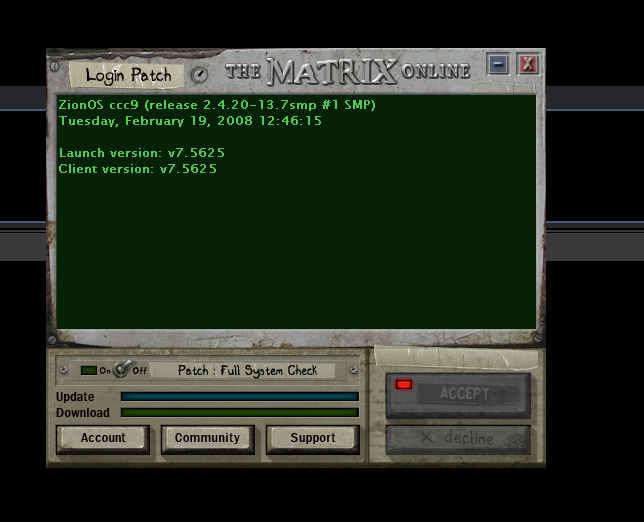
Been trying to jack in for over an hour.  I've tried patching and restarting my computer, still no effect.


It just sits like this for upwards of 10 minutes:


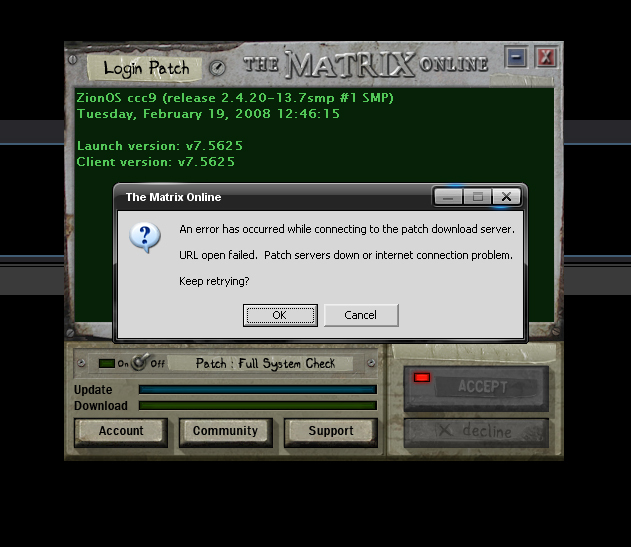
Then this message pops up:


Any ideas?
#36300409847 02/19/2008 11:14:51 Re:Client Launcher: Patch Server down?
jeffers wrote:
Hmm see you've got norton internet security, just check that isn't locked down and also check it has a rule in place for launcher.exe and matrix.exe. Additionally check that Internet Explorer isn't set to work offline. That can cause the same error. SMILEY" />

Jeffers

Came from here, I remembered my friend having the same problem. Hope this helps you.

#36300409850 02/19/2008 11:19:07 Re:Client Launcher: Patch Server down?
Gerik wrote:
jeffers wrote:
Hmm see you've got norton internet security, just check that isn't locked down and also check it has a rule in place for launcher.exe and matrix.exe. Additionally check that Internet Explorer isn't set to work offline. That can cause the same error. SMILEY<img mce_tsrc=" />

Jeffers

Came from here, I remembered my friend having the same problem. Hope this helps you.


Thanks Gerik, but I use Firefox and I don't have Norton =/

Might be campus internet, i'll move to another part of campus where the signal's stronger.

#36300410599 02/20/2008 11:04:41 Re:Client Launcher: Patch Server down?
Whether you use Firefox or not, the Launcher still uses Internet Explorer for it's patch server calls.

Therefore if Internet Explorer is set to Work Offline, the launcher won't be able to connect to the patch server.

Jeffers
#36300410603 02/20/2008 11:11:32 Re:Client Launcher: Patch Server down?
Nice job, Duke.  You broke the Matrix.
#36300413818 02/25/2008 00:17:51 Re:Client Launcher: Patch Server down?
i have exactly the same problem atm.

I jackedoff normaly do some stuff in RL and then as i wanna go back to Mega city


This weird problem


i dont reboot or shut off my pc in the time

any ideas or its maybe the PatchMonday ?
#36300414317 02/25/2008 15:39:34 Re:Client Launcher: Patch Server down?
LMAO! You WHAT? Jacked-out perhaps?

Anyway now that the patch is applied is it working now?
#36300414390 02/25/2008 18:35:21 Re:Client Launcher: Patch Server down?
Wow you know what man i had this same problem and guess what i fixed it, first to understand the things i need to use to understand is and remember answer Yes or no!:

1. Goto you internet explorer and goto Tools or File and if there is a checkmark next to Work Offline click it and turn it off. Now answer the question. Yes or no!

Did it work?

If it didn't please continue to number 2.

2. Ok go back to the internet explorer and tell me does it load pages, any page?

If no than please continue.

3. Make sure you firewall isn't blocking Internet Explorer, is it?

If no then continue.

4. Also your firewall might be blocking launcher.exe from connecting to the internet or the patch site, goto your settings and check and for more firewall and ports help goto another topic i made: http://forums.station.sony.com/mxo/...mp;#36300413704

Was it blocking?  Did you unblock? Is it working?

If it still isn't working continue.

5. If you have a router please look on my guide topic: http://forums.station.sony.com/mxo/...mp;#36300413704

6. If five didn't work all i did was reformat my computer and reinstalled the client and it worked, but you probably shouldn't if you don't want to.

Im all out of suggestions SMILEY