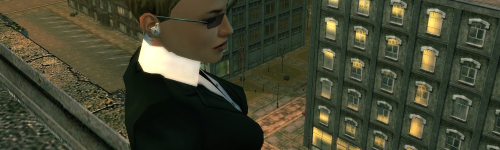
layer 1: source screenshot
> Normal
- Image Adjust: Auto Levels
layer 2: Copy of layer 1
> Normal
- Invert
layer 3: Copy of layer 2
> Difference
- horizontal motion blur 210
layer 4: Hue/Saturation layer
> Normal
- saturation +100
layer 5: Copy of layer 1
> Normal
- Poster Edges, all sliders far left
- Invert
- Select the figure (polygon lasso)
- Layer mask (now you've got just the figure showing)
layer 6: Copy of layer 5
> Lighten
- Gaussian Blue 2
layer 7: Copy of layer 5
> Lighten
- Gaussian Blur 17
layer 8: Hue/Saturation layer
> Normal
- saturation +100
- bind this layer so it only affects layer 7 (hold Alt, click between the layers)
layer 9: Levels layer
> Normal
- Input levels 0 1 206
The other two images are just Inverted from the first.
> Normal
- Image Adjust: Auto Levels
layer 2: Copy of layer 1
> Normal
- Invert
layer 3: Copy of layer 2
> Difference
- horizontal motion blur 210
layer 4: Hue/Saturation layer
> Normal
- saturation +100
layer 5: Copy of layer 1
> Normal
- Poster Edges, all sliders far left
- Invert
- Select the figure (polygon lasso)
- Layer mask (now you've got just the figure showing)
layer 6: Copy of layer 5
> Lighten
- Gaussian Blue 2
layer 7: Copy of layer 5
> Lighten
- Gaussian Blur 17
layer 8: Hue/Saturation layer
> Normal
- saturation +100
- bind this layer so it only affects layer 7 (hold Alt, click between the layers)
layer 9: Levels layer
> Normal
- Input levels 0 1 206
The other two images are just Inverted from the first.