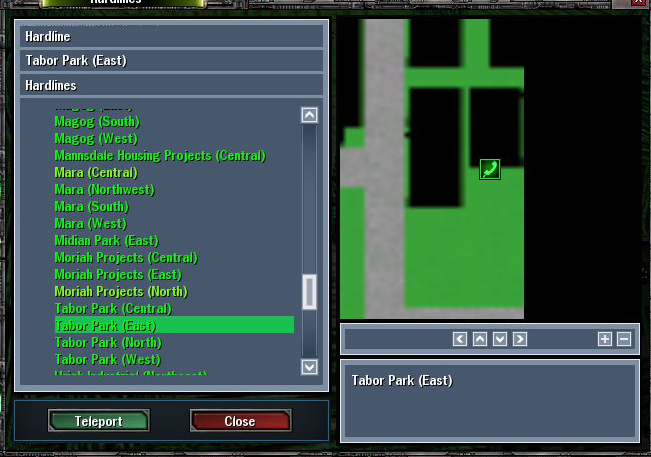
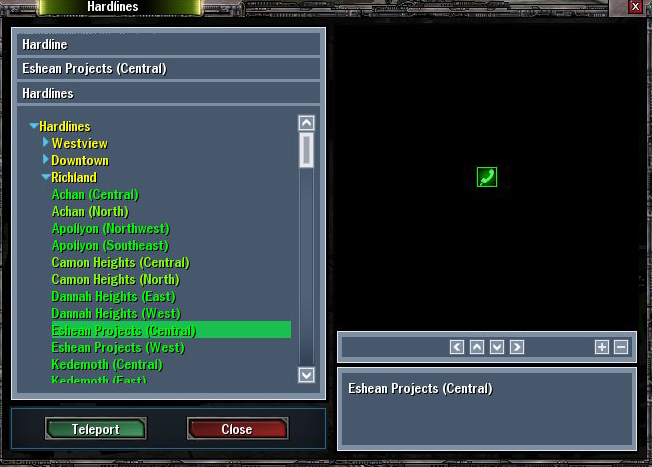
Ok, when I go to the hardline and click the "hardline" button to teleport me somewhere else, some of the maps to the side of the hardline name work. Others have either portions blacked out or all of it blacked out. Like so.
No, that is not a large building. It's Tabor East and that side of the map is blacked out.
Here's Eshean Projects. Completely blacked out except for the hardline icon.
I'm sure these maps are somewhere in the Profiles folder in the MxO directory. I suppose I need to delete some or something. I just don't want to delete the wrong thing. And, if deleting said file causes my hardline collection to vanish, then I don't want to do that either. Is there a fix that will keep all of my hardlines that i've found but give me the correct picture to go with it?
Did you try clicking the "Patch: Full system check" button on the launcher? If not, do so. If any of the files are corrupted, it'll download them again. If you still have problems then please go to the tech. forum, read the sticky there and post the information it asks for in a new topic on that forum.
First off, try clicking the Minus icon to zoom out and see if you still have problems. I always click that by habit just to get a better perspective of the surrounding area.
Secondly, the data regarding which hardlines you have tagged is stored server-side, so there's no chance that you'll delete it, since it's nowhere in your profiles folder. Besides, if you're looking to delete a file so it can be repatched, you'd probably want to do anything like that in the Resource folder, or maybe there's another one... I can't remember at the moment, I haven't slept since Sunday.
I also zoom in and out with my scroll wheel, that usually resolves the problem with 'blackouts.'
There is another problem I have noticed though. When I look at the maps next to downtown hardlines, I am allowed to see flags I have added to my map. However, flags next to Richland/Westview hardlines are not visible. I may have these districts confused, but I know for sure that the flags do not always show up. Has anyone else noticed this?
yeah, i have a flag just to the left of the creston sw hland it shows it evertime, but any that are in richland or westview fail to display although im not 100% sure.
When I zoom out, it shows everything. There is no blacked out portion at all. But when I zoom back in again, there's the blackout. And when I'm fully zoomed in and move the image around with the arrow buttons, the sides come up fine. Up and Down are still blacked out, but left and right actually produce a good image but the exact same portion is blacked out everytime. It seems to me like that would be a corrupted file in my MxO folder, but which one i'm not sure of. Does anyone know what file contains the pictures for HL maps?
And I have alot of missing HL pictures on my Atlas...like.. i have a hardline but it won't show up on the Atlas. Idk if that has anything to do with your 2 problems. O.o
if needs be send a /bug report ingame, but it's only a texture or picture problem so I doubt it'll be taken very seriously, especially as it sounds to me like a minor bug