How to - Add Signature - Add Avatar - Post Images

50 posts · 2006-07-20 01:10:07 to 2009-04-25 11:47:45

#36300000744 07/20/2006 01:10:07 How to - Add Signature - Add Avatar - Post Images

This guide shows you how to add either a signature, an avatar or post images in threads. 

How to add a Signature

Step 1
Select Profile from the menu at the top.

Step 2
Inset using html your code for your signature, this would be the url to where the signature is located online.

Use the img tags which are
<img src="http://i14.photobucket.com/albums/a.../aqua400100.jpg">

To add a hyperlink to your signature you would add the <a> tags and a border tag to your image.

<a href="http://www.themegacitytimes.com"><img border="0" src="http://i14.photobucket.com/albums/a349/aquatium1/aqua400100.jpg"></a>

Currently the signature size restrictions are 400*100, but they may change it back to 500*150 that we had before.

Step 3 
Then submit to confirm

 

-----------------------------------------------------------------------------------------------------------

How to add a Avatar

Step 1
Select Profile from the menu at the top.

Step 2
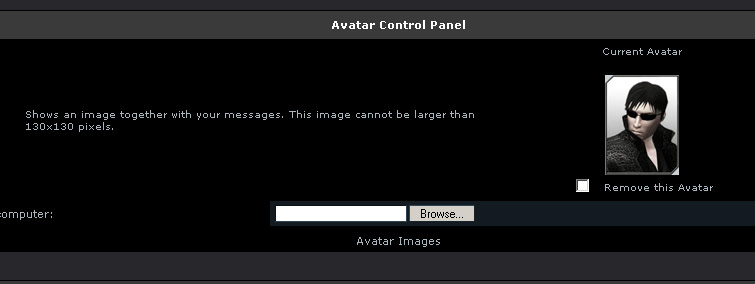
Scroll down to the Avatar Control Panel. The use the browe button to search your Harddrive for your avatar. Now this doesn't use online links, therefore it must be located on your harddrive. Reason being it converts them to png, to avoid people using large avatars (animated)
Step 3 
Then submit to confirm


-----------------------------------------------------------------------------------------------------------

How to post an Image

Step 1
In your post you will see these options.

You click on  Icon.

Step 2
You will then have a mini pop-up window show
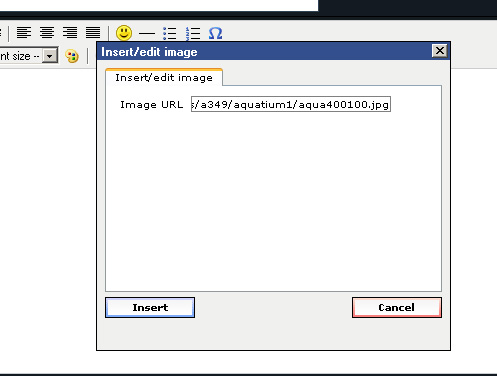
Enter your URL to the image, which must be hosted online somewhere.

Step 3
Click on Insert and the image is added to the post.

-----------------------------------------------------------------------------------------------------------

If you have any questions about this please just reply and anyone who can will try to help resolve it.

Archived Media

#36300000968 07/20/2006 03:28:31 Re:How to - Add Signature - Add Avatar - Post Images
Aqua with the lighting flahs relfexes. Was coming to do something similar and now it doesn't even seem likeI have much to add, except.


YOUR ONE STOP SHOP TO USING YOUR PROFILE FOR IMAGES!

Good work, bro.
#36300005130 07/23/2006 10:10:37 Re:How to - Add Signature - Add Avatar - Post Images
I just unstuck the other one and stuck this up there.
#36300005872 07/24/2006 17:31:57 Re:How to - Add Signature - Add Avatar - Post Images
damm i posted an avatar guide on the redpill rescue forum.

ahh well
#36300005916 07/24/2006 18:30:22 Re:How to - Add Signature - Add Avatar - Post Images
btw I can't add avatar, I think they turned it off because they were hosting it or summat
#36300005946 07/24/2006 19:22:47 Re:How to - Add Signature - Add Avatar - Post Images
NvM, I got it to show
#36300012913 08/01/2006 06:20:53 Re:How to - Add Signature - Add Avatar - Post Images
Checking to see if it shows up in here.  It doesn't show up in the other forums.
#36300012929 08/01/2006 06:44:42 Re:How to - Add Signature - Add Avatar - Post Images

Yep works fine, if it does here it should in the other forums sections, unless you mean another forum altogether

#36300013254 08/01/2006 12:52:45 How to - Add Signature - Add Avatar - Post Images
Great Guide
#36300014495 08/02/2006 18:25:51 Re:How to - Add Signature - Add Avatar - Post Images
 Lets see if this works, my sig I mean.
#36300014566 08/02/2006 19:47:31 Re:How to - Add Signature - Add Avatar - Post Images
the avatar thing is missing for me.... SMILEY
#36300014679 08/02/2006 22:13:55 Re:How to - Add Signature - Add Avatar - Post Images
 OKAAAY......that's about as good as Im gonna get I thnk SMILEY
#36300017194 08/05/2006 12:01:03 Re:How to - Add Signature - Add Avatar - Post Images
What program are you folks using to make the sigs?  I cant seem to figure it out.... :-/
#36300018856 08/07/2006 15:17:20 Re:How to - Add Signature - Add Avatar - Post Images
*demands a new thread, a merger between this and the tutorials one, to be made and stickied*
#36300027843 08/17/2006 15:31:44 Re:How to - Add Signature - Add Avatar - Post Images
Just seeing if my sig work`s yet .....
#36300027845 08/17/2006 15:34:28 Re:How to - Add Signature - Add Avatar - Post Images
Grrr....... i`m using this code = <img src="http://i30.photobucket.com/albums/c302/smokeydemon/usug.jpg">
#36300028124 08/17/2006 22:01:26 Re:How to - Add Signature - Add Avatar - Post Images
I'm not sure what's wrong with your coding, however, that sig you're trying to link is 500*169. Our forums have a max limit of 500*150. Although that shouldn't be causing it to not show up. Usually, oversized sigs just get cut off at the bottom. =\
#36300072469 10/15/2006 00:31:40 Re:How to - Add Signature - Add Avatar - Post Images

couldn't get my sig to show either

guess it did

#36300072779 10/15/2006 14:23:20 Re:How to - Add Signature - Add Avatar - Post Images
It doesn't work for me. There's nothing in My Profile that says Signature or Avatar.
#36300072785 10/15/2006 14:51:43 Re:How to - Add Signature - Add Avatar - Post Images
Soulfeed wrote:
It doesn't work for me. There's nothing in My Profile that says Signature or Avatar.
Well, you won't see an option for an Avatar, since that is more or less bugged for the moment. (Well, until further notice)  But, you should have a signature option/field where you can enter the address for your signature... unless of course they changed that too for some ranks.

Ranks are still in the process of being fixed, too.
#36300095103 11/13/2006 22:55:24 Re:How to - Add Signature - Add Avatar - Post Images
Soulfeed, I have the same problem.. I would guess it is a forum Rank issue...
#36300098194 11/17/2006 18:49:18 Re:How to - Add Signature - Add Avatar - Post Images
It is... since I asked the same question and it took about 15 minutes for the TSR to come up with a solution, which didn't work, since the option isn't there. I don't want to post a whole lot until I get a signature solution. I won't get a signature solution until I post a lot more. Catch 22.

That's some catch, that Catch 22.
#36300115224 12/08/2006 10:57:27 Re:How to - Add Signature - Add Avatar - Post Images

dont you need a certain amount of posts to be able to append a sig?

 coz on my profile i dont have signature options under biography? :S

this is my sig i want to append

#36300125406 12/21/2006 08:36:10 Re:How to - Add Signature - Add Avatar - Post Images

yeh but does anyone know how many posts ya gotta have?

can't find that out anywhere.

#36300126772 12/23/2006 11:49:30 Re:How to - Add Signature - Add Avatar - Post Images

I need some help.  I don't have any thing in my profile to allow me to use a signature.  I have no other input boxes below the biography area.  So, I can't even put in a signature.  Can you tell me what to do?

Thanks
Missionary of Zion
#36300126777 12/23/2006 12:07:48 Re:How to - Add Signature - Add Avatar - Post Images
I think it's because you're ranked as a bluepill, once you spend more time on the forums and post more you'll rank will go up
#36300184137 03/10/2007 06:04:50 How to - Add Signature - Add Avatar - Post Images
You must have posted 40 posts.
#36300184138 03/10/2007 06:05:10 How to - Add Signature - Add Avatar - Post Images
Sorry 30
#36300184140 03/10/2007 06:06:28 How to - Add Signature - Add Avatar - Post Images
12 posts for me to get the Signature Rights.
#36300184141 03/10/2007 06:07:45 How to - Add Signature - Add Avatar - Post Images
I think that it is Avatar too.
#36300184210 03/10/2007 07:58:17 How to - Add Signature - Add Avatar - Post Images
I am not sure about Avatar Rights.
#36300188043 03/14/2007 19:36:06 Re:How to - Add Signature - Add Avatar - Post Images
BloodWork wrote:
I think it's because you're ranked as a bluepill, once you spend more time on the forums and post more you'll rank will go up
***

Well that kinda sucks, IMO. I was wondering why none of the usual profile fields were available...

oh well...

/emote begins to climb the post ladder, resisting the urge to spam.
#36300188050 03/14/2007 19:41:50 Re:How to - Add Signature - Add Avatar - Post Images
AngryAngryMan wrote:
BloodWork wrote:
I think it's because you're ranked as a bluepill, once you spend more time on the forums and post more you'll rank will go up
***

Well that kinda sucks, IMO. I was wondering why none of the usual profile fields were available...

oh well...

/emote begins to climb the post ladder, resisting the urge to spam.
Psst. Forum party, Off Topic boards. Great booster. ;)
#36300188055 03/14/2007 19:47:36 Re:How to - Add Signature - Add Avatar - Post Images
ZippyTheSquirrel wrote:
AngryAngryMan wrote:
BloodWork wrote:
I think it's because you're ranked as a bluepill, once you spend more time on the forums and post more you'll rank will go up
***

Well that kinda sucks, IMO. I was wondering why none of the usual profile fields were available...

oh well...

/emote begins to climb the post ladder, resisting the urge to spam.
Psst. Forum party, Off Topic boards. Great booster. SMILEY

Did I hear forum party?

*strips down*

!UHN-TISS UHN-TISS UHN-TISS!

- RedLynk
#36300211352 04/11/2007 20:43:28 Re:How to - Add Signature - Add Avatar - Post Images
howcome when I goto "my profile" I don't see an avatar tab?
#36300211461 04/12/2007 00:48:43 Re:How to - Add Signature - Add Avatar - Post Images
I think the avatar restrictions are lifted once you've been registered on the boards for a year. So... you've only a month to go before the option pops up for ya. SMILEY
#36300211505 04/12/2007 02:30:13 Re:How to - Add Signature - Add Avatar - Post Images
Or when you have made 200 posts. I think.
#36300211507 04/12/2007 02:32:16 Re:How to - Add Signature - Add Avatar - Post Images
Joakim wrote:
Or when you have made 200 posts. I think.
nah, Avatar rights and probably signature rights are completely seperate from post count, even if you spammed the boards to hell and got 10,000 posts in a day you wouldn't have either of the 2. Although you would be trandescendant.
#36300211511 04/12/2007 02:39:14 Re:How to - Add Signature - Add Avatar - Post Images
pack-hunter wrote:
Joakim wrote:
Or when you have made 200 posts. I think.
nah, Avatar rights and probably signature rights are completely seperate from post count, even if you spammed the boards to hell and got 10,000 posts in a day you wouldn't have either of the 2. Although you would be trandescendant.
Oh...Well, there you have my insane amount of "correct" knowledge.
#36300211643 04/12/2007 05:53:34 Re:How to - Add Signature - Add Avatar - Post Images
pack-hunter wrote:
Joakim wrote:
Or when you have made 200 posts. I think.

Avatar rights and probably signature rights are completely seperate from post count, even if you spammed the boards to hell and got 10,000 posts in a day you wouldn't have either of the 2.

Someone in this thread suggested to me that as soon as I got to 30 posts I'd be able to have my signature...and they were correct. So, I can confirm Sigs are dependent on post count. Cant confirm the avatar thingy though.

#36300211651 04/12/2007 06:21:37 Re:How to - Add Signature - Add Avatar - Post Images

Sig is indeed 30 posts.

Avatar rights are given after 1 exact year subscribed.

Example:  I have an avatar and Havocide doesn't yet because although he is at 2500 posts, he isn't a veteran yet.  (plus he spams SMILEY)

#36300229034 05/02/2007 12:21:16 How to - Add Signature - Add Avatar - Post Images
sweet
#36300232923 05/08/2007 19:46:41 Re:How to - Add Signature - Add Avatar - Post Images
why won't my avater work??? I followed all of the instructions listed the first page and it still doesn't workSMILEY
#36300275588 07/06/2007 09:44:25 Re:How to - Add Signature - Add Avatar - Post Images

problem solved

THANKS!!

#36300286547 07/18/2007 23:32:41 Re:How to - Add Signature - Add Avatar - Post Images

My Avatar "Browse" button is missing for me as well, along with my SIG "box"....  How can i add my own(avatar & Sig) without it?

Hmmm...


Ahhh...


#36300395419 01/29/2008 02:03:03 Re:How to - Add Signature - Add Avatar - Post Images
I can confirm the "year before an avatar" is based on the date of forum registration, not game subscription. I registered the game pre-Sony, stopped playing around the time of the sale, and so never got around to checking these boards out until a couple of weeks ago when I drifted back in for a while. No avatar option here...

Ah, well. Also no hurry.


Consider the wisdom of the sage Alhamb, who said, "The only battle which matters is the first." That is to say, once the first trial has been overcome, all that follow will seem far easier. Now consider the wisdom of the sage Djirr, who said, "The only battle which matters is the last." - Kafkar


#36300410297 02/19/2008 23:45:39 Re:How to - Add Signature - Add Avatar - Post Images

Thanks for the post i appreciate the help.

#36300485218 08/04/2008 16:16:30 Re: How to - Add Signature - Add Avatar - Post Images

That was probably answered already - I haven't read all the posts here - but how many posts do we need to get signature / avatar rights?

#36300485221 08/04/2008 16:24:22 Re:Re: How to - Add Signature - Add Avatar - Post Images
Tohya wrote:

That was probably answered already - I haven't read all the posts here - but how many posts do we need to get signature / avatar rights?

Signature:

Hacker - 90 days + 10 posts (permission for signature granted)

Avatar:
I think is you have to be here 1 year.
#36300555477 04/25/2009 11:47:45 Re:How to - Add Signature - Add Avatar - Post Images

Now I know why I couldn't find an avatar or signature-option... strange thing. Never seen this one-year-thing on other game-forums before... should be changed, in my opinion.

Whatever, getting close