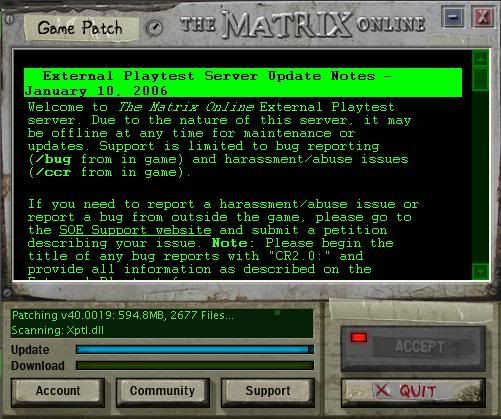
My launcher keeps freezing up at "scanning: xptl.dll" ... the patch finishes downloading, and it goes to that and stays, I've tired multiple times to restart it, and it always get to there and freezes.. any ideas.. i've tried using the system patch thing, and tried not using it.. it all does the same thing
#3490000081701/10/2006 17:59:23Re: Problem patching...
I hope mind doesn't do that. I've been downloading for a while now. . . not done yet.
#3490000083701/10/2006 18:08:07Re: Problem patching...
This is where it sits..
Message Edited by xBLINDSIDEx on 01-10-200606:08 PM
#3490000086901/10/2006 18:32:07Re: Problem patching...
20 minutes later.. still hanging out at the same spot...
#3490000105901/10/2006 20:18:30Re: Problem patching...
and 2 hours later... same spot.
#3490000106701/10/2006 20:27:08Re: Problem patching...
Hey, Great!!! An error!
#3490000107301/10/2006 20:40:11Re: Problem patching...
Man, I am getting the same crap. Just got to exit the patcher and then re-open it it seems. Mine got all the way to zchar_misc.pkb until I just X'ed it out just now.
This is just really weird. I have a reason to think its because they shut down the QA for the night.
#3490000107601/10/2006 20:46:05Re: Problem patching...
I was thinking the same thing, except i've never gotten passed this, I was trying to patch it before the server even became open, and was having the problem, I've yet to get passed that file.. I'm thinking about deleting the test server folder and starting all over again..
#3490000110601/10/2006 22:16:29Re: Problem patching...
Well.. I deleted the test world folder, and started over... still no luck, though i finally got to the next file and am now stuck on glck.ltb... ::sigh:: 4 hours later.. still nothing.
#3490000110701/10/2006 22:20:21Re: Problem patching...
I've been having the same problem all night, except mine didn't even get that far before it just stops downloading. I thought maybe it was just going slow, so i killed a couple hours watching tv, came back, still the same spot after 7 tries.
"The heart never speaks, but you must listen to it to know." -The Oracle
#3490000112301/11/2006 00:22:47Re: Problem patching...
Guys, first rule of thumb for patching MxO: never trust the launcher to give an accurate display of the download's progress. Just go into your MxO folder and find the folders called "_patchctldltemp" or something like that and check the files inside (might need to hit F5 to refresh the data). If the filesize of one of the files inside is increasing, it's still downloading, regardless of what file it may be "stuck" on in the launcher.
Granted, it may really be stuck, but always check the actual patch files instead of relying on the launcher.
#3490000120501/11/2006 07:55:38Re: Problem patching...
Hah, it's working, Stack. Thanks alot man!
Though I wonder if this means it resetted everytime I exited the thing and such... I'm at 27.6 MB and I was at 18.0 MB when I started again not 30 minutes ago.
#3490000120601/11/2006 08:01:35Re: Problem patching...
I cant even get to the patching screen
Im not running on my C:/ drive so I copied just as Data Node One says then I made the text file, copied the info and saved file as useropts.cfg.
Made shortcut of launcher as recommended and nothing. I have basically 2 instances of my regular game, so basically I could click either copy and still enter Vector or whatever.
WTH could I be doing wrong? I went by these instructions exactly and now I just have 2 seperate installs of my original game.
Message Edited by IgnitionX on 01-11-200608:07 AM
#3490000120701/11/2006 08:14:17Re: Problem patching...
Well, I tried to just start it, and then I went to bed, woke up once, and I got the timeout thing that I posted above, started over, went back to bed.. woke up.. and same thing again...
#3490000120801/11/2006 08:14:25Re: Problem patching...
IgnitionX wrote: I cant even get to the patching screen
Im not running on my C:/ drive so I copied just as Data Node One says then I made the text file, copied the info and saved file as useropts.cfg.
Made shortcut of launcher as recommended and nothing. I have basically 2 instances of my regular game, so basically I could click either copy and still enter Vector or whatever.
WTH could I be doing wrong? I went by these instructions exactly and now I just have 2 seperate installs of my original game.
Message Edited by IgnitionX on 01-11-200608:07 AM
Ther must be an error in the useropts.cfg u made. i think. Make sure that it accually isn't called useropts.cfg.txt, can happen very easy when making the file... Here is a working one if u need it: http://www.disco-dynamo.dk/mxo/useropts.cfg
Message Edited by LeskiL on 01-11-200605:25 PM
#3490000120901/11/2006 08:17:19Re: Problem patching...
I have to ask this... don't get me wrong here... I just have to ask this....
Ingnitionx
In your sig it would seem you have some kind of bikini bottoms or a thong sticking out the top of your skirt.... Am I seeing that correctly or did you place those in with a pen?
Again... I just can't stop myself from having to ask this.. lol :smileyvery-happy:
Message Edited by MorVidEye on 01-11-200610:18 AM
Message Edited by MorVidEye on 01-11-200610:19 AM
#3490000121001/11/2006 08:17:42Re: Problem patching...
BLindside try downloading this file http://www.disco-dynamo.dk/mxo/Xptl.dll and place it in the mxo testser folder . It's from my testserver folder, thats succesfully patched. i have no idea if it will work Sorry for the no clicky... but can't make em in opera browser, and i hate firefox and IE!!!!
Message Edited by LeskiL on 01-11-200605:19 PM
#3490000121101/11/2006 08:18:57Re: Problem patching...
MorVidEye wrote:
I have to ask this... don't get me wrong here... I just have to ask this....
Ingnitionx
In your sig it would see you have some kind of bikini bottoms or a thong sticking out the top of your skirt.... Am I seeing that correctly or did you place those in with a pen?
Again... I just can't stop myself from having to ask this.. lol :smileyvery-happy:
Message Edited by MorVidEye on 01-11-200610:18 AM
**DELETED** Misunderstood the question sorry.
Message Edited by LeskiL on 01-11-200605:21 PM
#3490000121301/11/2006 08:21:34Re: Problem patching...
I know that's a weird question to ask lmao. but I've noticed it a while ago and ever sense I have been wondering... is that really what it looks like? I had to take the oppertunity to find out once and for all.
#3490000121601/11/2006 08:32:31Re: Problem patching...
Trying to patch now, it's already got to that spot and froze again.. I'm gonna try tech. support when they open, but talking to them is sometimes like talking to a machine... I'm about to start offering a sakura bandana to the person that can get my patch to go through... I've never had any problems patching ever, until now.. I tried checking my patch progress log.. and after all of this, this is all i've gotten...
there is also something in the patchctl doc, that says..
2006.01.11.10.22.56.000 [1152]: Error: (digest verify) Current sz (1081344) does not match expected sz (38659829): C:\Program Files\Monolith Productions\The Matrix Online Test World\_patchctldltemp\packmaps\char_npc.pkb-40.0019-c5cbe984ee66c3764ae5fde50cc49173336e413d.z
I don't know if that has anything to do with my problems either... I feel kind of hopeless though..
#3490000121801/11/2006 08:33:55Re: Problem patching...
try to delete your C:\Program Files\Monolith Productions\The Matrix Online Test World\_patchctldltemp\packmaps\char_npc.pkb-40.0019-c5cbe984ee66c3764ae5fde50cc49173336e413d.z file
#3490000121901/11/2006 08:35:20Re: Problem patching...
All you need to do, Blind, is have a folder open in the MxO Test World directory and hover your mouse over the _patchcltdtemp folder and press F5. If the totally file size is going up, the patch is working. If not, then... Crap.
#3490000122101/11/2006 08:38:48Re: Problem patching...
I tried that earlier, and it wasnt moving.. since I deleted the file and started over, it is moving.. but the launcher still shows the same thing.. now I guess I'll wait and see.
#3490000122301/11/2006 08:40:24Re: Problem patching...
When I patched my reporter stuck on that same file but it continued to progress. it never stoped showing the glick file or whatever but being it was moving forward showed it was actually patching. I would say if it is moving now then your patching. well done!.... I hope :smileywink:
#3490000122501/11/2006 08:41:31Re: Problem patching...
Anybody know how big the char_npc.pkb-40.0019-c5cbe984ee66c3764ae5fde50cc49173336e413d is when it's close to being complete?? For some reason I patch really slowly, I have a 9mbps connection, and it stutters along like I'm on dial up... Could it be a port or something the game is trying to download from or something..
#3490000122901/11/2006 08:43:56Re: Problem patching...
can't be that big. because the complete char_npc.pkb is 65mb
#3490000123001/11/2006 08:45:25Re: Problem patching...
I also noticed this. yes, for some reson even those of us on fast connections don't all download the patches very fast. it took me over an hour to download what any other download this size would have taken like 25 minutes or so to get. probably a bandwidth issue or something on their end.
#3490000123101/11/2006 08:45:26Re: Problem patching...
Its only gotten to 5mbs since I started about 10 minutes ago, could the download going so slowly be what is causing my timeout??
Message Edited by xBLINDSIDEx on 01-11-200608:48 AM
#3490000123301/11/2006 08:46:40Re: Problem patching...
**bleep**, problem... this is whats been happening, it starts to download.. then stops and resets to 112k.. and only that file is showing in my packmaps folder, and its stopped getting bigger.
What i meant by that was, the file was up to almost 6mbs and then just reset itself to 112k.. and since has stopped
Message Edited by xBLINDSIDEx on 01-11-200608:48 AM
#3490000123501/11/2006 08:48:02Re: Problem patching...
Thanks LeskiL! That was exactly my problem.
As far as the thong is concerned MorVidEye............Dont you have these on Syntax?
Im afraid with all the attrib buffs on them I will be pantyless on the Q&A.
just kidding :smileywink:
#3490000124901/11/2006 09:02:46Re: Problem patching...
if i where u blindside. i would just delete the mxo test folder. and start from scratch!
#3490000125201/11/2006 09:06:25Re: Problem patching...
lol.. I did that twice last night.. I'm gonna try to find someone to post that file for me.. maybe I'll be ok once I get past that..
#3490000125501/11/2006 09:07:36Re: Problem patching...
How in the world did you get a pair of those? I could have used a pair of those as my matrixmas present...... to my secret santa target sykin who ALWAYS trys on lady things when people arn't looking.
Yeah, he's daper.
no really where and how and how much? I'm perverse enough to make the payment.
#3490000126301/11/2006 09:15:44Re: Problem patching...
xBLINDSIDEx wrote: lol.. I did that twice last night.. I'm gonna try to find someone to post that file for me.. maybe I'll be ok once I get past that..
Ok what file do u need. i can make a new copy a test server and get u the file... bored anyway
#3490000126701/11/2006 09:21:54Re: Problem patching...
I'm waiting on tech support right now, not holding my breath though.. I need that one file that I was deleting, I know its like 65mb like you said... but that is file that always freezes up in my log and in my folder the "char_npc.pkb" file.. i was thinking if i replaced the one in my packmaps folder, with an already patched one, maybe it'll skip over it.. who knows though.. just a thought... lets see what tech support has to say..
#3490000127001/11/2006 09:22:54Re: Problem patching...
i got a webspace where i can put it up for u if ur gonna need it
#3490000127601/11/2006 09:30:57Re: Problem patching...
I'm still in queue for tech support, i'm number 1 though... I think the auto response bots that they have dont know how to analyze my long problem. I don't know for a fact that it'll work if i put a patched file in that it'll work.. but i guess it might.. lol, still in queue, I have a bad feeling about this...
#3490000128601/11/2006 09:40:44Re: Problem patching...
ok 20mins from now, and it's on my webspace... but just remember, that if ur gonna use the file. make sure to make a full system scan at first launch, to make sure it checks the file and sees u got the right one.
#3490000129401/11/2006 09:44:55Re: Problem patching...
yea, i'm gonna use it... as my response from tech support was ...
TSR Manuel D.: Unfortunately we do not support the test center nor beta servers for they are meant to have issues.
Brilliant... So good luck to those of us having issues.. because we're on our own trying to figure them out.
#3490000130201/11/2006 09:55:11Re: Problem patching...
Alright, so, I watched my patch folder until it was like 120 MB... Then all of a sudden after a slight pause on 120 MB it's back to downloading from 5 MB. I think it's at like 22.0 MB now.
The file name of the RAR that is increasing steadily now is "dialog_1a.pkb-40.0019-4c4e96025ab7fb4392d970e2f81fe646efd69679"
Is this because there are multiple patches and this is a new RAR file?
EDIT: It ain't true, Morvid; we all know you want to impress your secret lover - THE ASSASSIN!
Message Edited by Sykin on 01-11-200610:06 AM
#3490000130801/11/2006 10:03:32Re: Problem patching...
Sounds like its patching just fine.. I'm not 100% on this, but I think once it patches the file it moves it to your packmaps folder, and starts patching the next file.. which would explain why your download size dropped, I could be wrong though..
#3490000130901/11/2006 10:05:05Re: Problem patching...
Ok here is the file blindside : http://www.disco-dynamo.dk/mxo/char_npc.pkb . the location for the file is "mxo folder"\packmaps
#3490000131101/11/2006 10:05:59Re: Problem patching...
::crosses fingers::
#3490000131201/11/2006 10:07:12Re: Problem patching...
Oh sweet. It is working! Ok, my question is void now I guess.
#3490000131401/11/2006 10:12:52Re: Problem patching...
How did you figure me out sykin? was it in the eyes? in my smirk every time he sauntered by swinging his fly made hips? or was it that big *CENSORED* picture of me in that mask I made in the pictures post that made you scream out... ASSASSIN!!!oneone!!!one!!one!!!
No really ignition...how when where and how much.... you can't degrade me enough to procure a pair. Can you decomp them... copy them? I have money, power, male genetalia.... name it!!
#3490000133101/11/2006 10:40:27Re: Problem patching...
Unfortunately this QA from hell is not responding to my computer. I cannot even get to the patch screen. I followed directions exactly. The download went smoothly and created that new icon on my desktop. I double click on the new launcher to start it up and I get this message:
"Failed to create a copy of the launcher or a critical support library for patching. If you have a file called Matrix.exe in your game directory, please make sure it is writable."
Just to be sure I double click on the normal Matrix launcher and it works perfectly fine. Roukan, Raineo, Call and everyone on vent attempts to assist me. I delete the client and do it manually. I copy my current MxO client and then add that useropts.cfg notepad thing. I create a shortcut for the launcher on the desktop and rename it. I double click on launch and guess what I get? Yes the same message.
So I write click on the Test launcher folder and it says read only in properties. Everytime I click it off it defaults back to read only. So we think that may be the problem. But then just to make sure I right click properties on my normal MxO launcher and it also says read only, yet I am still able to log in game so that cannot be the problem. So Raineo suggests that I turn off all of my firewall and zone alarm stuff. Still no dice.
Roukan even sent me his launcher over aim and I still get the same message. My last resort is to completely wipe MxO off my hard drive and do a reinstall, but that scares me because I may not be able to get in the normal MxO.
#3490000133401/11/2006 10:47:00Re: Problem patching...